Key takeaways
- Searching for the best projectors for 500? Compare five native 1080p models for movies, gaming and streaming, with brightness, throw distance and guidance.
The best projectors for 500 give you a genuinely big screen without a big-screen budget. In this class you can find native 1080p resolution, brightness that holds up with the lights low, and built-in streaming on some models, all in projectors that fit the under-500 budget class. The catch is that the market is crowded with lookalike models that advertise inflated brightness and resolution figures, so choosing well matters more than choosing fast.
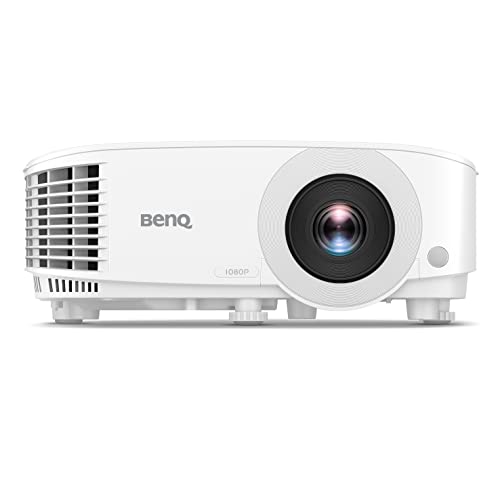

Quick answer: for most people, the BenQ TH575 is the strongest all-round pick in this class, thanks to its high brightness and low input lag, while the NexiGo PJ40 Pro is the easiest option if you want Google TV built in and the TCL A1s is the most portable choice. If your room has ambient light, lean toward the bright lamp models. If you mostly watch in a dark room and want the simplest setup, lean toward the smart LED models.
Quick Picks
Our Short List of 3
All 5 Picks at a Glance
| Product | Specs | Action |
|---|---|---|
| BenQ TH575 — Best Overall |
| Check price on Amazon |
| Optoma HD146X — Best for Movies and Gaming |
| Check price on Amazon |
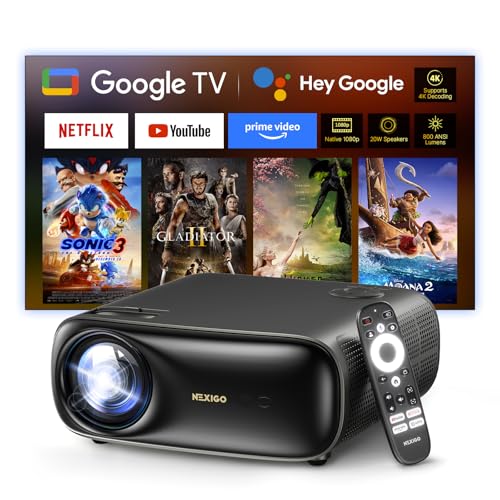 NexiGo PJ40 Pro — Best Smart Projector |
| Check price on Amazon |
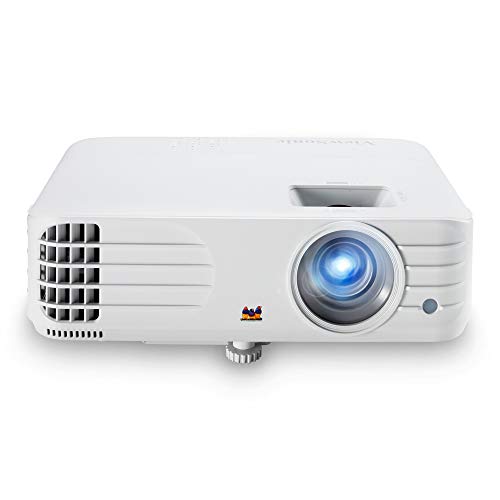 ViewSonic PX701HD — Best Bright Value |
| Check price on Amazon |
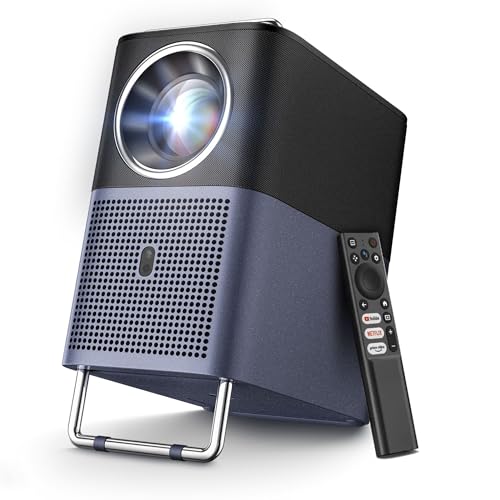 TCL A1s — Best Portable Pick |
| Check price on Amazon |
How to Choose
Native Resolution Comes First
The single most important specification in this class is native resolution, and it should be 1080p. Native resolution is the actual number of pixels on the imaging chip, and it is different from supported resolution. Many low-cost projectors advertise 4K support while their native panel is far lower, so a model that accepts a 4K signal can still display a soft image. Every projector in this guide has a native 1080p panel, which keeps text readable, faces detailed and sports broadcasts sharp at large screen sizes. When you compare models, look for the words native 1080p in the specification table rather than in the headline, and treat supported resolution as a compatibility note, not a quality claim.
Brightness Decides Where You Can Watch
Brightness decides whether a projector works in your room or only in a cave. Lamp-based DLP models in this class advertise 3,500 to 3,800 lumens, while LED models advertise 600 to 800 ANSI or ISO lumens, and those two scales are not directly comparable. The practical rule is simple: if your room has windows, lamps or light-colored walls, the brighter lamp models will give you a far more watchable image. If you watch mostly at night with the lights off, a 600 to 800 lumen LED model can look excellent and runs quieter. Be skeptical of headline figures in the thousands from unfamiliar brands, because independent measurements often find far less. Stick with brands that publish ANSI or ISO figures, and dim the room whenever you can.
Throw Distance and Screen Size
Before you buy, measure the distance from where the projector will sit to your wall or screen, because that distance decides your image size. Standard-throw projectors in this class typically produce a 100-inch image from around 10 to 14 feet away, and a 120-inch image needs a little more room. Check the throw ratio and the zoom range for each model, since a small amount of zoom gives you useful flexibility when a shelf or table is not in the ideal spot. If your room is short, look for a model with a shorter throw or plan to sit the projector closer and accept a smaller image. Keystone correction can square up an image when the projector sits off-center, but it trims resolution at the edges, so a straight-on placement always looks better.
Smart Features or a Streaming Stick
Some projectors in this class have Google TV built in, with licensed apps ready to open, while others have no smart system at all and expect you to plug in a streaming stick, console or laptop. Built-in smart features are genuinely convenient: one remote, one power cable and no extra device to buy. The trade-off is that a built-in system can feel slower than a dedicated stick, and app support varies by model. If you already own a streaming stick or a games console, a non-smart projector is no hardship at all, and you may get a brighter image for the same budget. Decide which camp you are in before you compare models, because it splits this class cleanly in two.
Sound, Ports and Placement
Built-in speakers vary widely, from a single 10W speaker that is fine for a bedroom to dual 20W speakers that can fill a living room at moderate volume. If you plan to watch films properly, budget for a soundbar or external speakers eventually, whatever the projector claims. Ports matter too: look for at least one HDMI input, and two is better if you plan to connect both a streaming stick and a console. USB ports are useful for powering a stick, and a 3.5mm audio output lets you connect older speakers or headphones. Finally, think about placement. A ceiling mount gives the cleanest setup, a shelf behind the sofa works well, and a portable model with a handle and a carry case suits rooms that double as something else during the day.
Lamp Life and Running Costs
A projector is not a one-time purchase in the same way a television is, because lamp models have a bulb with a rated life. In this class, lamp life typically runs to around 15,000 hours in eco mode, and up to 20,000 hours in the most economical modes, which amounts to many years of evening viewing. LED models use a light source rated far longer and need no bulb changes, which is one of their quiet advantages. Whatever you choose, running eco mode when the room is dark extends life and reduces fan noise, and keeping the air vents clear matters more than any setting. Check that replacement lamps are available for your model before you commit, since a cheap projector with no spares is a short-lived bargain.
The Best Projectors for 500 Reviewed
BenQ TH575 — Best Overall
The BenQ TH575 is the strongest all-round projector in the under-500 class, and it earns that spot with brightness. Its 3,800 ANSI lumen output is the highest in this guide, which means it holds up better than any rival here when the room is not fully dark. The native 1080p DLP image is sharp and vivid, with Rec.709 color coverage that keeps skin tones natural and sports broadcasts punchy. Gamers get a 16.7ms low input lag mode, dual HDMI inputs and 3D support, while the 10W chamber speaker is serviceable for casual viewing. Auto vertical keystone correction and a 1.1x zoom make placement forgiving, and the three-year warranty is longer than most rivals in this class.
The trade-offs are modest but worth knowing. There is no smart system built in, so you will need a streaming stick or another source device, and the built-in speaker is no substitute for a soundbar on film night. The TH575 is also a full-size lamp projector rather than a portable unit, so it suits a fixed spot on a shelf or a ceiling mount better than a bag. For a living room or a dedicated movie space, though, it is the pick that asks for the fewest compromises.
Optoma HD146X — Best for Movies and Gaming
The Optoma HD146X is a long-running favorite in this class, and it remains a strong choice for anyone who splits time between films and console games. Its native 1080p DLP panel delivers 3,600 lumens of brightness with a 25,000:1 contrast ratio, and the six-segment color wheel produces vivid, well-saturated color. Enhanced Gaming Mode cuts input response to 16ms, and Game Display Mode lifts shadow detail so dark scenes stay readable. The image can stretch up to 301 inches, and lamp life runs to 15,000 hours in eco mode, so this is a projector built for years of regular use.
There are two things to note before buying. First, this is an older model, first available in early 2020, so it has no built-in smart features and only a single HDMI input, which means a streaming stick will occupy your only HDMI port. Second, its listed pricing has moved around the budget line over time, so confirm the exact listing and variant on the product page before ordering. Neither point changes the picture quality, which is the reason this model has stayed relevant for so long.
NexiGo PJ40 Pro — Best Smart Projector
The NexiGo PJ40 Pro is the pick for anyone who wants to plug in power and start watching, with no extra boxes. Google TV is built in, with licensed apps including Netflix, and the interface is controlled from a backlit remote. The native 1080p LCD panel produces 800 ANSI lumens, which is a genuine measured figure rather than an inflated marketing number, and AI image enhancement plus auto keystone correction keep setup simple. Dual 20W speakers are among the strongest built-in audio in this class, and Wi-Fi and Bluetooth cover wireless streaming and external speakers.
The main limitation is brightness. At 800 ANSI lumens, the PJ40 Pro is best in a dimmed or dark room, and it will look washed out in daylight in a way the lamp models in this guide will not. It is also an LCD design, so black levels are good rather than outstanding. If your viewing happens mostly in the evening and you value convenience over raw brightness, those trade-offs are easy to accept, and the PJ40 Pro is the most complete out-of-the-box package here.
ViewSonic PX701HD — Best Bright Value
The ViewSonic PX701HD is the value pick among the bright lamp models, delivering 3,500 lumens of native 1080p DLP projection with SuperColor technology for rich, accurate color. Low input lag makes it a capable gaming projector, and the vertical lens shift is a genuinely useful feature at this level, letting you adjust the image position without moving the projector or leaning on keystone correction. Dual HDMI inputs mean a streaming stick and a console can stay connected at once, and SuperEco mode stretches lamp life to up to 20,000 hours. The 12,000:1 contrast ratio keeps dark scenes detailed, and the image stays watchable with moderate ambient light.
As with the other lamp models here, there is no smart operating system, so plan on a streaming stick, and the built-in audio is basic enough that external speakers are worth adding for films. The PX701HD is also a full-size unit, so it belongs on a shelf or a mount rather than in a travel bag. For a bright living room where the projector will live in one place, it delivers a lot of image for the budget class.
TCL A1s — Best Portable Pick
The TCL A1s is the most portable projector in this guide, and it is the one to choose if your projector needs to move between rooms, travel to a friend’s house or head outside for a movie night. It packs a native 1080p panel, 600 ISO lumens, Google TV with licensed Netflix, auto focus and auto keystone into a compact body with a metal Versagrip handle that doubles as a stand, and it ships with a portable carry case. Dual 8W Dolby Audio speakers produce clear sound for its size, and Wi-Fi and Bluetooth cover streaming and audio accessories. Setup is close to automatic: place it down, let it focus and square the image, and open an app.
Portability comes with a brightness trade-off, so the A1s is at its best in a dark room, where its image looks sharp and colorful, and it will struggle in daylight. One caution when ordering: TCL also sells the earlier A1 model with lower brightness, so confirm the listing shows the A1s with 600 ISO lumens and the handle-and-case bundle before you buy. For bedrooms, travel and backyard movie nights, the A1s is the most flexible option in this class.
What to Check Before You Buy
Before you order, run through a short checklist that prevents the most common disappointments. First, measure your throw distance and confirm the image size you will get at that distance, because a projector that cannot fill your wall from your shelf is the wrong projector. Second, decide whether you need built-in smart features or are happy with a streaming stick, since that choice splits the models above into two groups. Third, think about light: count the windows, note whether you watch during the day, and be honest about how dark the room gets. Fourth, check the exact model and variant on the listing page, including the ASIN, because similar model names can hide meaningful differences in brightness and features. Fifth, confirm the return terms and the warranty, and check that replacement lamps or accessories are available for lamp models. Finally, plan your sound. Even the best built-in speakers in this class are a compromise, so a soundbar or a pair of powered speakers will transform film night more than any specification upgrade.
Frequently Asked Questions
Are projectors in the under-500 class good enough for movies?
Yes, for most viewers they are. A native 1080p projector in this class produces a sharp, colorful image at 100 inches and beyond, and in a dark room the experience is closer to a cinema than to a television. The main limits are brightness in daylight and black levels compared with far more expensive models. If you watch mostly in the evening, you will be happy with any of the five picks above.
Do I need a screen, or can I use a wall?
A plain white wall works well to start, provided it is smooth and matte. A dedicated screen improves contrast and brightness uniformity, and a fixed or pull-down screen is worth adding once you know your setup is permanent. Avoid glossy or colored walls, which tint the image and create hot spots. If you are projecting onto a wall, a flat matte white or very light grey surface gives the best result.
Is native 1080p enough, or should I look for 4K?
Native 1080p is enough for the vast majority of viewing at typical seating distances, and every model in this guide is native 1080p. True native 4K projectors sit well above this budget class, and many low-cost models that advertise 4K only accept a 4K signal while displaying a lower-resolution image. Spend your budget on brightness, contrast and features instead of a 4K label.
Can I use these projectors for gaming?
Yes. The BenQ TH575, Optoma HD146X and ViewSonic PX701HD all have low input lag modes around 16ms, which is responsive enough for console and PC gaming. The smart LED models are fine for casual gaming, though their brightness and input lag are less suited to fast competitive play. For the best gaming experience, use game mode, connect over HDMI, and keep the projector in a dim room.
How long do projector lamps last?
Lamp models in this class are typically rated for around 15,000 hours in eco mode, with some reaching up to 20,000 hours in their most economical setting. At a few hours of viewing each evening, that amounts to many years of use. LED models use a light source rated far longer and need no lamp changes. Running eco mode, keeping vents clear and avoiding frequent on-off cycles all help extend lamp life.
Bottom Line
The best projectors for 500 are better than ever, and the right choice depends on your room rather than on a single specification. Choose the BenQ TH575 if you want the brightest, most capable all-round projector for a living room or movie space. Choose the Optoma HD146X if movies and gaming share equal time. Choose the NexiGo PJ40 Pro if you want Google TV built in and the simplest setup. Choose the ViewSonic PX701HD if you want bright-lamp value with flexible placement. Choose the TCL A1s if portability matters most. Measure your room, be honest about the light, and confirm the exact model on the listing page before you buy.
Disclosure: As an Amazon Associate, we may earn from qualifying purchases.