Our Short List of 3
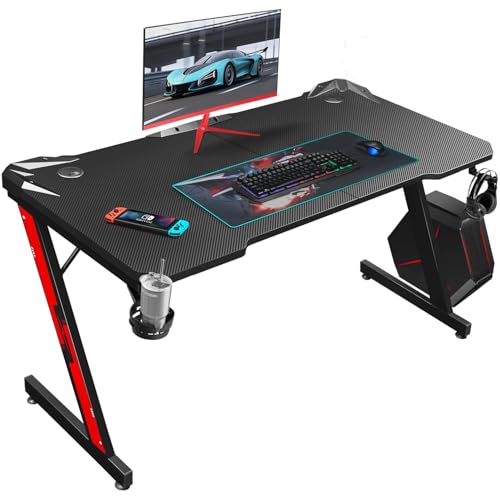
- Best for: A first gaming setup built around one monitor and a standard keyboard.
- Brand: Homall
- Size: 44 inch
- Item dimensions: 23.6 x 44 x 29.3 inches
- Shape: Rectangular

- Best for: Corner setups where charging, shelving and a monitor shelf need to live in one footprint.
- Brand: Bestier
- Size: 42 inch
- Item dimensions: 32.28 x 41.93 x 35.91 inches
- Shape: L-shaped gaming corner desk

- Best for: Very small rooms that still need outlets, lighting and shelf storage at the desk.
- Brand: Korfile
- Size: 40 inch
- Item dimensions: 39.4 x 25.6 x 29.5 inches
- Shape: L-shaped
All 3 Picks at a Glance
| Product | Specs | Action |
|---|---|---|
| Homall Gaming Desk, 44 Inch |
| Check price on Amazon |
| Bestier Gaming Desk with Power Outlets, 42 Inch L-Shaped |
| Check price on Amazon |
| Korfile 40 Inch Gaming Desk with LED Lights & Power Outlet |
| Check price on Amazon |
Key takeaways
- Compare the best desks for gaming under 120, from a 40 inch corner desk with outlets and LED lighting to a simple 44 inch Z-frame table, plus sizing tips.
A gaming desk in this price class has to solve a specific problem: giving a monitor, keyboard, mouse and headset a stable home without eating the whole room or shaking every time you lean on it. The real decision is not the finish or the lighting. It is whether the frame stays rigid under a full setup, whether the desktop is deep enough for a monitor at a comfortable viewing distance, and whether cables and drinks have somewhere sensible to go.
This guide is for first-time setup builders, students in dorm rooms, and anyone replacing a wobbly kitchen table with a desk actually sold for gaming. Every pick below is a gaming desk, chosen from the product names and specifications published on its Amazon product page, and the three finalists cover the shapes buyers compare most: a straight Z-frame table and two compact L-shaped corner desks with built-in power.
Quick Picks
As an Amazon Associate we earn from qualifying purchases.
| Product | Best for | Key spec from title |
|---|---|---|
| Homall Gaming Desk, 44 Inch | A simple straight desk for a single-monitor setup | 44 inch carbon fiber surface |
| Bestier Gaming Desk with Power Outlets, 42 Inch L-Shaped | Corner setups that need shelves and charging at the desk | L-shaped with 2 outlets, USB and Type-C |
| Korfile 40 Inch Gaming Desk with LED Lights & Power Outlet | Small rooms that still want lighting and storage | 3 AC outlets and 2 USB ports |
How to Choose
Desktop Size and Depth
Width decides how much gear sits side by side, but depth decides whether the setup feels comfortable. A desktop around 24 inches deep keeps a monitor close, which suits smaller screens and tight rooms, while a deeper top near 29 inches leaves room to push the display back and rest your forearms on the surface. Measure the wall space you actually have, including room for your chair to roll back, before falling for the widest option. An L-shaped top uses a corner that a straight desk wastes, although it also fixes your layout once it is built.
Frame Design and Stability
Budget gaming desks stand on Z-shaped, Y-shaped or panel legs, and the frame geometry matters more than the styling printed on it. Triangular joints, crossbars and thicker steel tubing all reduce the side-to-side sway that shows up when you type hard or bump the desk mid-game. Check the listed weight capacity against everything you plan to load: monitor, PC tower if it sits on top, speakers and books add up quickly. Adjustable foot pads are worth having because few floors are perfectly level, and a small wobble at the pad becomes a shake at the screen.
Power, Lighting and Cable Routing
Built-in outlets move charging onto the desk, so a phone, headset stand and controller dock stop competing for the wall socket behind your PC. Count the AC outlets and USB ports on the listing and match them to your gear rather than assuming more is better. LED strips are an atmosphere feature, not a performance one, but a strip mounted under a shelf also works as soft task light. For cables, look for management holes, a cord collector or a rear channel in the product description; without one, plan on a separate tray and leave slack for a height-adjustable chair.
Storage and Assembly
Shelves, monitor stands and hooks change how a small desk lives day to day. A raised monitor stand frees the surface under the screen for a keyboard to slide away, and open shelves keep a console or game cases off the floor. Reversible designs let the return sit on the left or right, which matters in rented rooms where the corner is fixed. Finally, read the assembly notes on the listing: these desks arrive flat-packed, part counts vary widely, and a second pair of hands makes the L-shaped builds noticeably easier to square up.
The 3 Best Options
Homall Gaming Desk, 44 Inch
- Best for: A first gaming setup built around one monitor and a standard keyboard.
- Brand: Homall
- Size: 44 inch
- Item dimensions: 23.6 x 44 x 29.3 inches
- Shape: Rectangular
A first gaming setup built around one monitor and a standard keyboard.
There is no built-in power or shelving, so check that your wall outlet and floor space can handle charging and storage separately.
The Homall is the straightforward pick for a gamer who wants a gaming desk without shelves, lights or a corner layout to plan around. Its 44 inch carbon fiber textured top fits a monitor, keyboard and mouse with room left for a headset on the included hook, and the Z-shaped alloy steel frame with triangular joints is built to keep that load steady. A cup holder keeps drinks off the mouse area, and a cord collector under the desk gathers the cables that usually dangle behind a first setup. It suits single-monitor players in bedrooms and dorms who value a simple, sturdy rectangle.
Bestier Gaming Desk with Power Outlets, 42 Inch L-Shaped
- Best for: Corner setups where charging, shelving and a monitor shelf need to live in one footprint.
- Brand: Bestier
- Size: 42 inch
- Item dimensions: 32.28 x 41.93 x 35.91 inches
- Shape: L-shaped gaming corner desk
Corner setups where charging, shelving and a monitor shelf need to live in one footprint.
Confirm the corner dimensions and which side the return must sit on before ordering, and note the total height includes the upper shelf.
The Bestier turns a corner into a complete small gaming station. The 42 inch L-shaped top wraps storage shelves along the return, and those shelves are reversible, so the layout can mirror to fit the corner you actually have. A power strip built into the desk provides two AC outlets plus USB and Type-C charging, which covers a monitor, a console and a phone without a separate power bar on the floor. An LED light strip sits under the upper shelf, and the shelf itself can work as a monitor stand or side display shelf. It fits players who want gear stored at the desk rather than around the room.
Korfile 40 Inch Gaming Desk with LED Lights & Power Outlet
- Best for: Very small rooms that still need outlets, lighting and shelf storage at the desk.
- Brand: Korfile
- Size: 40 inch
- Item dimensions: 39.4 x 25.6 x 29.5 inches
- Shape: L-shaped
Very small rooms that still need outlets, lighting and shelf storage at the desk.
Measure your monitor and keyboard against the 40 inch top carefully; dual screens will overwhelm this footprint.
The Korfile is the smallest desk here, an L-shaped 40 inch model aimed at rooms where a full-size table simply will not fit. It still packs in the features bigger desks advertise: an RGB LED strip with app control for lighting effects, and a built-in outlet bank with three AC sockets and two USB ports for a monitor, tower and charging cables. Storage shelves and a monitor stand lift clutter off the main surface, which matters when the top is this compact. It suits console and PC players furnishing a small bedroom, a shared apartment corner or a starter streaming nook.
Which One Fits Your Situation
A First Setup in a Bedroom Corner
If the desk has to live in a corner and hold more than a screen, start with the Bestier. Its reversible shelves use the return for consoles, games and a headset, the built-in outlets remove the power bar from the floor, and the raised shelf clears space on the main top. It is the most complete single purchase of the three for a corner that has to do everything.
One Monitor and a Small Room
A single-monitor player who just needs a solid surface should take the Homall. The straight 44 inch top slides against any wall, the Z-frame keeps it steady, and the cup holder and headphone hook cover the two things that otherwise end up on the floor. There is nothing to configure and no corner geometry to measure, which keeps a small-room setup simple.
A Compact Desk With Lighting and Charging
When the room is tight but you still want the desk to feel like a gaming station, the Korfile fits the brief. Its 40 inch L-shape tucks into corners the others cannot use, the app-controlled LED strip sets the mood without extra purchases, and three AC outlets handle a monitor, a tower and a lamp while the USB ports charge controllers and a phone.
A Desk That Doubles for Study or Work
All three tops are flat, clear surfaces once the gaming gear is pushed back, so any of them can host a laptop and notebooks during the day. The Bestier has the edge for homework and office hours because its shelves hold books and supplies within reach, while the Homall’s plain rectangle gives the most uninterrupted writing space for essays, sketches or paperwork.
Common Mistakes
- Measuring only the wall width and forgetting depth, chair roll-back space and the swing of a door behind the setup.
- Loading a desk past its listed weight capacity by parking a heavy PC tower, dual monitors and speakers on a light frame.
- Choosing an L-shaped desk without checking whether the return can sit on the side your room actually requires.
- Ignoring cable routing until after assembly, then finding the outlet bank or cord path is blocked by the frame.
- Assuming LED lighting and extra ports matter more than frame rigidity, when stability is what you feel in every session.
Frequently Asked Questions
How much space does a 40 to 44 inch gaming desk really hold?
A top in this range comfortably holds one monitor up to a mid-size screen, a full keyboard, a mouse with its pad and a headset. Two monitors usually crowd a 40 inch desk and leave no elbow room, so dual-screen players should look wider or choose an L-shape that spreads gear across the return.
Are L-shaped gaming desks harder to assemble than straight ones?
They take longer because there are two tops to align plus shelves to square, and the reversible models add a decision about which side the return goes on. The listings note that assembly is required and instructions are included. Building on a clear floor and keeping bolts loose until the frame is aligned makes the job much easier.
Do built-in outlets on a gaming desk replace a power strip?
For desk-level gear, largely yes. The outlet banks on the Bestier and Korfile cover a monitor, a console or tower, and charging for phones and controllers, which removes the separate strip many setups rely on. High-draw items and anything that must stay far from the desk still belong on wall power, and the total load should stay within the rating printed on the listing.
What should I check before a gaming desk arrives?
Confirm the boxed and assembled dimensions against your doorway, stairs and the exact corner or wall run, and check the floor for level where the feet will land. Decide in advance where the PC tower goes, since on-desk and under-desk placements change which desk depth works. Photographing the empty space with measurements marked helps if anything needs to change.