Key takeaways
- Offload photos and video faster with the best memory card readers for home office desks, covering UHS-II support, dual slots, connectors, and speeds.
If your home office work involves a camera, a drone, or an action camera, the slowest step in your day is probably getting files off the memory card. A dedicated card reader fixes that. It offloads photos and video far faster than a camera’s USB connection or a laptop’s aging built-in slot, reads the fastest modern cards at their full rated speed, and keeps working when you switch computers.
The five readers below cover the main desk scenarios: two UHS-II models that move professional photo and video files at up to 312 megabytes per second, a SanDisk reader tuned to squeeze maximum speed from SanDisk’s own cards, and two compact Anker readers for mixed desks and phone offloads. All connect over USB-C or offer both USB-C and USB-A plugs, and all read SD and microSD cards, the two formats home office creators actually use.
As an Amazon Associate, we earn from qualifying purchases.
Quick Answer
The UGREEN SD 4.0 Card Reader, model 65024, is the best all-round desk reader, with UHS-II support, SD and microSD slots, and both USB-C and USB-A connectors. Choose the SanDisk Professional PRO-Reader if you shoot on SanDisk Extreme PRO UHS-I cards and want their full QuickFlow speed, and the Anker PowerExpand+ for a simple dual-connector reader for UHS-I cards.
How to Choose
Start with your cards, because the card sets the ceiling. UHS-II cards have a second row of pins and can transfer at up to 312 megabytes per second, but only in a reader that supports UHS-II; in a UHS-I reader they fall back to UHS-I speeds near 104 megabytes per second. If you shoot with a modern mirrorless camera and UHS-II cards, a UHS-II reader is the single biggest speed upgrade in this guide. If your cards are UHS-I, a good UHS-I reader is enough, with one exception covered by the SanDisk pick below.
Next, count your slots. A dual-slot reader that handles SD and microSD covers cameras, drones, and action cameras with one device, and readers that can access both cards at once let you copy a drone card while a camera card downloads. Most home office desks are better served by one dual-slot reader than by two separate dongles.
Then check the connector. USB-C is the modern default and suits current laptops, tablets, and phones. A reader with both USB-C and USB-A connectors, or a dual-headed plug, stays useful across an older desktop and a new laptop without adapters. Cable length matters too: a short built-in cable suits a laptop, while a tower under the desk may need a longer cable.
Finally, consider the host port and build. A reader rated for USB 3.2 speeds needs a matching port to deliver them, and a metal body survives daily bag duty better than thin plastic.
UGREEN USB C SD 4.0 Card Reader (Model 65024)

This UGREEN reader is the most complete desk option here. It reads SD and microSD cards with full SD 4.0 support, handling UHS-II cards at up to 312 megabytes per second and UHS-I cards at their full speed as well. That makes it the right match for current mirrorless cameras and high-bitrate video work, where a card full of footage can be the difference between a quick offload and a long wait.
The connector design is equally practical. Both USB-C and USB-A plugs are provided, so the same reader serves a new laptop and an older desktop without adapters, and the two slots can be read at the same time for parallel copies. Model 65024 is the version to look for, since UGREEN sells several similar readers and only the SD 4.0 models carry the UHS-II hardware. For a mixed home office, this is the reader to buy first.
Specs
| Spec | Detail |
|---|---|
| Card support | SD and microSD, SD 4.0 |
| Speed class | UHS-II and UHS-I, up to 312 MB/s |
| Connectors | USB-C and USB-A |
| Model | 65024 |
UGREEN USB C SD 4.0 UHS-II Card Reader (Model 15251)

UGREEN’s 15251 reader covers the same fast ground as the 65024 with a different shape: a compact USB-C reader focused on UHS-II SD and microSD cards at up to 312 megabytes per second. It suits a desk built around a single modern laptop, where USB-C is the only connector needed and a small reader can stay plugged in or ride in a sleeve.
Both card slots handle UHS-II and UHS-I media, so one reader covers a camera’s SD card and a drone’s microSD card in the same session. The aluminum-style shell feels a step up from basic plastic dongles. Choose this model over the 65024 if you never need a USB-A plug and prefer the smallest possible reader; choose the 65024 if the reader must serve older computers too.
Specs
| Spec | Detail |
|---|---|
| Card support | SD and microSD |
| Speed class | UHS-II and UHS-I, up to 312 MB/s |
| Connector | USB-C |
| Model | 15251 |
SanDisk Professional PRO-Reader SD and microSD

The PRO-Reader exists for one specific job: getting maximum speed from SanDisk’s own Extreme PRO UHS-I cards. Those cards use SanDisk’s QuickFlow technology to read at up to 200 megabytes per second, well beyond the standard UHS-I limit, but only a SanDisk reader can unlock it. In a generic reader, the same cards fall back to ordinary UHS-I speeds, so photographers invested in Extreme PRO media leave real time on the table without this reader.
The unit itself is a solid aluminum desk reader with SD and microSD slots and a USB-C connection running USB 3.2 Gen 1. It is larger than the dongle-style readers here, which suits a permanent place on the desk beside a monitor. Note the focus: this reader is built around UHS-I and QuickFlow rather than UHS-II, so if your cards are UHS-II, the UGREEN models above are the faster choice.
Specs
| Spec | Detail |
|---|---|
| Card support | SD and microSD |
| Technology | SanDisk QuickFlow for UHS-I cards |
| Interface | USB-C, USB 3.2 Gen 1 |
| Model | SDPR5A8-0000-GBAND |
Anker PowerExpand+ 2-in-1 SD 3.0 Card Reader
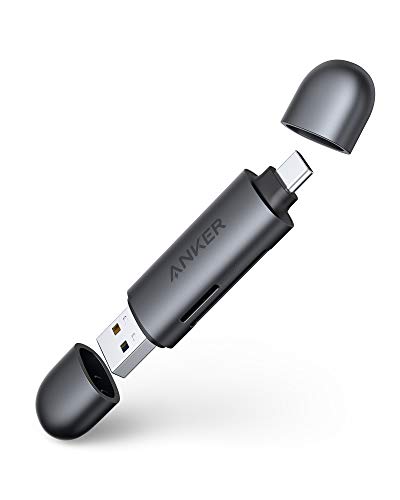
Anker’s PowerExpand+ reader, model A8326, is the flexible everyday pick for desks with UHS-I cards. It carries both a USB-C connector and a USB 3.0 USB-A connector, so it plugs into practically any computer made in the last decade without an adapter, and its two slots read SD and microSD cards, including SDXC, SDHC, and older MMC formats.
Speeds follow the UHS-I standard, which is entirely adequate for office photography, meeting recordings, dashcam and drone footage on UHS-I cards, and general file shuttling. The slim body disappears into a drawer or a cable pouch, and there are no drivers or settings to manage on Windows or Mac. If your cards are UHS-I and your computers are a mix of old and new, this reader covers every seat at the desk with one purchase.
Specs
| Spec | Detail |
|---|---|
| Card support | SD and microSD, UHS-I |
| Connectors | USB-C and USB 3.0 USB-A |
| Model | A8326 |
| Setup | Plug and play, no drivers |
Anker MagGo USB-C SD Card Reader

The MagGo reader, model A83D1, takes a different route to the desk: it is a magnetic USB-C adapter with a short built-in cable, designed to snap onto the back of a USB-C iPhone and offload SD and microSD cards straight to the phone at up to 312 megabytes per second. For a home office creator who shoots on a camera and posts or backs up through a phone, it removes the computer from the chain entirely.
It is equally happy plugged into a USB-C laptop or tablet, where it behaves as a compact dual-slot reader for SD and TF cards. The magnetic design and short cable make it a travel-first tool rather than a permanent desk fixture, and it is aimed at Apple’s USB-C iPhone models in particular. Choose the MagGo if your workflow runs through your phone.
Specs
| Spec | Detail |
|---|---|
| Card support | SD and microSD |
| Transfer | Up to 312 MB/s |
| Design | Magnetic, built-in cable |
| Model | A83D1 |
Who Should Skip It
Skip a dedicated reader if your laptop’s built-in SD slot already matches your cards’ speed and you rarely offload more than a few photos. Skip the UHS-II models if every card you own is UHS-I and you have no plans to upgrade cameras, since the cheaper UHS-I readers will perform identically with your media. And skip all five if your camera uses CFexpress or XQD cards, which need a different class of reader built for those formats.
FAQ
Is a UHS-II reader worth it for UHS-I cards?
It will not make UHS-I cards any faster, since the card itself sets the limit. It is worth buying if you expect to own UHS-II cards soon, because the reader will already be on your desk when the new cards arrive. Otherwise, a quality UHS-I reader such as the Anker PowerExpand+ performs exactly the same with the cards you have.
Why is my fast card copying slowly?
The usual causes are a reader that does not support your card’s speed class, a USB 2.0 port or hub in the chain, or a slow destination drive. Connect the reader directly to a USB 3 port on the computer, confirm the reader supports UHS-II if your card is UHS-II, and copy to an SSD rather than a hard drive for the fastest offloads.
Can these readers copy two cards at once?
The dual-slot UGREEN and Anker readers expose both cards to the computer at the same time, so you can copy from an SD card and a microSD card in parallel. Combined speed is shared across the connection, but the convenience outweighs it for office-sized offloads.
Do card readers work with phones and tablets?
USB-C models generally do. The Anker MagGo is designed specifically for USB-C iPhones, and the other USB-C readers here work with iPads and Android devices that support USB storage. Check that your phone supports external storage over its port, and use the device’s Files app to browse the card once connected.
Final Verdict
For most home office desks, the UGREEN 65024 is the reader to buy: UHS-II speed, both card formats, and both USB connectors in one compact body. The UGREEN 15251 trims that formula down for USB-C-only setups, the SanDisk PRO-Reader rewards owners of SanDisk Extreme PRO UHS-I cards with their full QuickFlow speed, and the two Anker models cover mixed UHS-I desks and phone-first workflows. Match the reader to your fastest card, and offloading stops being the slow part of your day.