Key takeaways
- Compare the best desk fans for home office use, from compact USB fans to bladeless models, and stay cool and comfortable through long workdays.
A home office that runs warm can drain your focus by mid-afternoon. A desk fan is the simplest fix: it moves air across your workspace, runs quietly enough for calls, and takes up far less room than a tower or pedestal fan. The right model keeps you comfortable without papers flying off the desk.
The five fans below cover the main desk-friendly formats: compact USB fans that run from a laptop, a small traditional fan with an AC adapter option, and bladeless designs that look tidy on camera. All of them suit desks, dorms, and small offices.
As an Amazon Associate, we earn from qualifying purchases.
Quick Answer
For most home office desks, a compact USB fan like the Gaiatop TF30 or the Koonie USB fan is the easiest choice, offering three speeds, quiet operation, and simple tilt adjustment from any USB port. If your desk appears on video calls and you prefer a cleaner look, a bladeless fan such as the KONSIDEN F6 or the let’me desk fan keeps the airflow smooth and the profile tidy.
How to Choose
Size comes first. A desk fan should cool you, not dominate the desk. Compact models around four to six inches across fit beside a monitor or laptop without crowding your keyboard. Bladeless tower-style desk fans take a slightly taller footprint but leave a narrower base, which can work better between a monitor and the desk edge.
Power source shapes how you use the fan. USB fans draw power from a laptop, a desktop, or a power bank, so they are easy to place and move, and they stop when the computer sleeps unless you use a wall adapter. Corded electric models plug into the wall and run independently, which suits a fixed desk. Check the cable length either way, so the fan can sit where the airflow actually reaches you.
Speed settings and noise go together. At least two or three speeds let you run a gentle breeze during calls and a stronger flow during focused work. For video meetings and shared rooms, look for designs described as quiet, and plan to use the lowest speed that still feels comfortable while your microphone is live.
Airflow direction matters more than raw power at desk distance. A fan head that tilts lets you aim air at your face and upper body rather than at your papers. Some models fold flat or rotate widely, which helps in tight setups where the fan must sit to the side. Bladeless fans spread air in a smoother, less gusty stream, which some people find more comfortable for all-day use.
Finally, think about cleaning and stability. Bladed fans collect dust on the grille and blades and need occasional wiping. Bladeless designs are easier to wipe clean. A fan with a stable, weighted base will not creep across the desk from vibration on higher speeds.
Gaiatop USB Desk Fan TF30
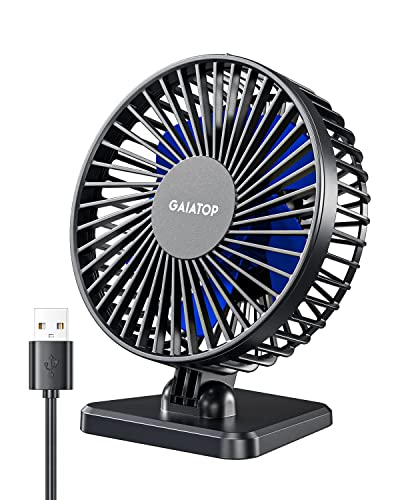
The Gaiatop TF30 is a small but capable USB fan built for personal cooling at a desk. It offers three speeds, a quiet motor for its size, and an adjustable head so you can tilt the airflow toward you instead of rearranging the desk.
Specs
| Feature | Detail |
|---|---|
| Power source | USB powered |
| Speeds | 3 |
| Cable length | About 3.3 feet |
| Adjustment | Tilting head |
| Model number | TF30 |
Its compact footprint fits on crowded desks, in home offices, and even in a car or travel bag when you work away from home. Running from USB means it pairs naturally with a laptop setup and needs no spare wall outlet.
Choose the Gaiatop if you want a straightforward, portable desk fan that you can move from room to room. It is a good first fan for students, remote workers, and anyone whose desk setup changes often.
Treva 3.5 Inch Portable Desk Fan

The Treva is a small traditional fan from O2COOL with a 3.5 inch blade span, designed for tight spaces. It runs from USB or batteries and includes an AC adapter, giving it more power flexibility than most fans in this size class.
Specs
| Feature | Detail |
|---|---|
| Blade size | 3.5 inches |
| Power source | USB, battery, or AC adapter |
| Adapter | Included |
| Brand | Treva by O2COOL |
| Model number | FD35021A |
The battery option is the standout feature: the fan keeps running during a power outage, at an outdoor desk, or anywhere a USB port is not handy. Its small size suits monitor-side placement and cramped cubicles.
Pick the Treva if you value backup power options or need a fan that works in places without easy USB access. Campers, market stall holders, and anyone with an unreliable power supply will appreciate the flexibility.
Koonie USB Fan
The Koonie is a USB-C powered desk fan with a wide 220-degree tilt and a folding design, so it can aim almost anywhere and pack flat for storage or travel. It offers three speeds and is built to run quietly enough for office and bedroom use.
Specs
| Feature | Detail |
|---|---|
| Power source | USB-C powered |
| Speeds | 3 |
| Tilt range | 220 degrees |
| Design | Folding |
| Model number | F464 |
The wide tilt range solves a common desk problem: the fan can sit low or off to the side and still direct air upward at your face. The folding body also makes it easy to slip into a drawer when the weather turns.
Choose the Koonie if your desk layout forces the fan into an awkward corner, or if you want a fan that disappears into storage between seasons. Note that it is corded only, with no internal battery, so it needs a live USB-C power source.
KONSIDEN Bladeless Desk Fan F6

The KONSIDEN F6 is an 11.8 inch bladeless desk fan with touch controls and three speed settings. With no exposed blades, it presents a clean, modern profile on camera and is simple to wipe clean, since there is no grille trapping dust.
Specs
| Feature | Detail |
|---|---|
| Height | 11.8 inches |
| Design | Bladeless |
| Speeds | 3 |
| Controls | Touch control |
| Model number | F6 |
The bladeless format produces a smooth, even stream of air rather than distinct gusts, which many people prefer for all-day comfort. It is also a sensible choice around curious kids or pets, since there are no spinning blades to reach.
Pick the KONSIDEN if your desk is visible on video calls and you want cooling that looks like part of a tidy setup. It runs from a corded power supply rather than a battery, so plan a permanent spot near an outlet or USB source.
let’me Desk Fan, Bladeless with Ambient Light

This 11.8 inch bladeless fan adds a five-color ambient light to the usual desk fan formula, along with four speed settings. It runs over USB and suits desks, bedrooms, and dorms where one device doing two jobs saves space.
Specs
| Feature | Detail |
|---|---|
| Height | 11.8 inches |
| Design | Bladeless |
| Speeds | 4 |
| Extra feature | 5-color ambient light |
| Power source | USB |
The ambient light is a soft glow rather than a task light, useful for evening work sessions when you want a calmer atmosphere. Four speeds give finer control than the usual three, from a barely-there breeze to a stronger flow on hot afternoons.
Choose the let’me if you like the bladeless format and want the extra mood lighting for a bedroom office or dorm desk. If you only need air movement and nothing else, the simpler models above will suit you just as well.
Who Should Skip It
Skip a desk fan if your real problem is a hot room rather than personal comfort, since a small fan moves air but does not lower the room temperature; a window unit or better ventilation solves that. Desk fans are also unnecessary if your workspace already has strong air conditioning that reaches your seat. And if you are extremely sensitive to background noise during recorded calls, test any fan on its lowest speed with your microphone before relying on it daily.
FAQ
Can I run a USB desk fan from a laptop all day?
Yes. USB desk fans draw very little power and are designed for continuous use from a laptop, desktop, or power bank. Using a wall adapter frees the laptop port and keeps the fan running when the computer sleeps.
Are bladeless desk fans quieter than bladed ones?
Bladeless models tend to produce a smoother sound without blade chopping, and they are easier to clean. Actual noise depends on speed, so the lowest comfortable setting is the quietest choice for calls with either type.
Where should I place a desk fan?
Place it to the side of your monitor, aimed at your face and upper body, far enough from loose papers that they stay put. A tilting head makes this easier than moving the whole fan around.
Do desk fans use much electricity?
No. Small USB and bladeless desk fans use a fraction of the power of air conditioning or even a tower fan, which is why they are popular for all-day home office use.
Final Verdict
For most home office desks, the Gaiatop TF30 and the Koonie USB fan are the easiest recommendations: compact, quiet, and simple to power. The Treva adds battery and adapter flexibility for unreliable power or portable use. If appearance matters, the KONSIDEN F6 and the let’me bladeless fans keep a desk looking tidy while moving air smoothly. Pick based on your power source and placement, and you will stay comfortable through the workday.