Key takeaways
- Compare the best label makers for a home office, from Brother and DYMO tape machines to Bluetooth thermal printers for files, cables, and storage boxes.
A home office accumulates anonymous stuff fast: identical storage boxes, a drawer of lookalike charging cables, file folders that only make sense to whoever filled them. A label maker turns that clutter into a system. Labeled cables end the unplug-and-guess routine, labeled files survive a busy tax season, and labeled shelves let anyone in the house put things back where they belong.
This guide covers five label makers that suit home office use, from a classic Brother tape machine with a full keyboard to pocket-size Bluetooth thermal printers that work from a phone. The buying advice below explains the real divide in this category, laminated tape versus direct thermal printing, and how tape width and running costs should shape the choice.
As an Amazon Associate, we earn from qualifying purchases.
Quick Answer
For most home offices, the Brother P-Touch PT-D210 bundle is the best pick because its QWERTY keyboard, laminated TZe tapes, and included spare tapes handle files, boxes, and cables without a phone. Choose the Phomemo D30 or NIIMBOT B21 for cheap, ink-free Bluetooth labeling, or the DYMO LabelManager PnP for labels designed on a computer.
How to Choose
The first decision is the printing technology. Laminated tape machines from Brother and DYMO print on plastic tape with a protective layer, so labels resist water, sunlight, abrasion, and the heat inside a cable drawer for years. Direct thermal printers such as the Phomemo and NIIMBOT models need no ink or ribbon and cost less to run, but their labels can fade with heat and sunlight, which makes them better for indoor files and boxes than for long-lived equipment tags.
Tape width decides what the labels can say. A 12mm tape covers file folders, jars, and most cables. Wider formats help on storage boxes and shelf edges where text must read from a distance. Cable labeling deserves special mention: wrap-around or flag-style labels from narrow tape work well, and laminated tape survives the warmth behind a desk better than thermal paper.
Consider how labels get designed. A built-in QWERTY keyboard makes one-off labels fast with no phone or computer involved. App-based printers offer nicer fonts, icons, and templates but add setup steps for every quick label. A PC-connected model suits batch jobs, such as printing a whole set of file labels from a spreadsheet list at once.
Running costs matter more than the machine price over time. Genuine laminated tapes cost more per label than thermal rolls, and third-party compatible tapes exist for both systems at lower cost with variable quality. Factor in batteries or charging too: keyboard machines often run on AA batteries or an optional adapter, while the Bluetooth printers recharge over USB.
Brother P-Touch PT-D210 Label Maker Bundle
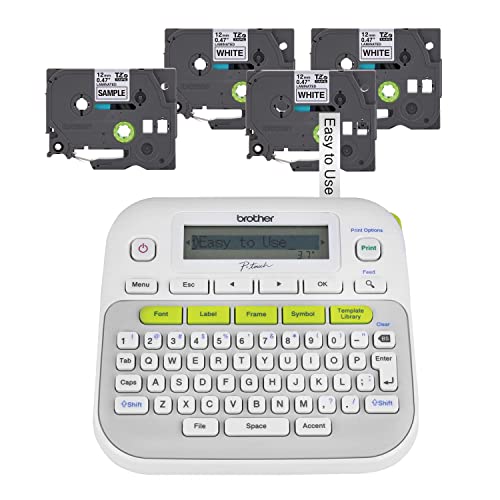
The PT-D210 is the classic home office label maker, and this bundle adds four tapes so it can start work immediately. It prints on laminated TZe tapes up to 12mm wide, which resist water, fading, and abrasion on file boxes, binders, and cables. The QWERTY keyboard and graphic display make standalone labeling quick, with fonts, frames, and symbols stored for repeat designs.
It stores up to 30 label designs in memory, prints up to two lines, and runs on six AAA batteries or an optional AC adapter. The laminated output is the main reason to choose it over cheaper thermal printers: a cable label printed today will still be readable after years behind a warm desk. For a general-purpose office labeler that needs no phone and no app, this is the dependable standard.
Specs
| Spec | Detail |
|---|---|
| Print method | Thermal transfer, laminated tape |
| Tape type | Brother TZe, up to 12mm wide |
| Keyboard | QWERTY with graphic display |
| Power | 6 AAA batteries or optional adapter |
| Memory | Stores up to 30 label designs |
| Bundle | Label maker plus 4 tapes |
DYMO LabelManager 160

The LabelManager 160 is DYMO’s answer for quick handheld labeling, with a QWERTY keyboard, one-touch smart keys for bold, italics, and text size, and a clear display that previews the label before printing. It uses DYMO D1 tapes in 6, 9, and 12mm widths, including colors suited to color-coding files and boxes.
The type-and-print workflow is fast for single labels around the office, and the machine runs on six AAA batteries or an optional adapter. D1 tapes are durable for indoor office use, though Brother’s laminated TZe line has the edge for harsh spots. Buyers already invested in D1 tapes, or who prefer DYMO’s font and symbol selection, will feel at home here. It is a close rival to the Brother, decided mostly by tape preference.
Specs
| Spec | Detail |
|---|---|
| Print method | Thermal transfer |
| Tape type | DYMO D1, 6mm, 9mm, and 12mm |
| Keyboard | QWERTY with one-touch smart keys |
| Power | 6 AAA batteries or optional adapter |
| Display | Label preview screen |
| Lines | Prints up to 2 lines |
DYMO LabelManager PnP
The LabelManager PnP takes the opposite approach to the handheld models: it has no keyboard at all and plugs into a PC or Mac over USB, where labels are designed in DYMO’s software with the computer’s fonts, graphics, and clip art. That makes it the best pick here for batch jobs, such as a full run of file folder labels or a sheet of asset tags for office equipment.
It prints on D1 tapes up to 12mm wide and runs from a rechargeable battery charged over the same USB connection, so there are no disposable batteries to manage. The trade-off is that every label needs the computer, which slows down the one-off cable tag. For an office that labels in organized batches at the desk, the PnP workflow is cleaner than any handheld.
Specs
| Spec | Detail |
|---|---|
| Print method | Thermal transfer |
| Tape type | DYMO D1, up to 12mm wide |
| Connection | USB to PC or Mac |
| Keyboard | None, software design only |
| Power | Rechargeable battery via USB |
| Best for | Batch labels and file runs |
Phomemo D30 Bluetooth Label Maker

The D30 is a pocket-size direct thermal printer that pairs with a phone over Bluetooth and prints through an app loaded with fonts, icons, frames, and templates. Because it is thermal, there is no ink or ribbon to buy, and the rechargeable battery keeps it cable-free. Rolls of label tape in many colors and patterns make it popular for jars, cosmetic organizers, and light office labeling.
The honest limits are durability and width. Thermal labels fade faster than laminated tape, especially with heat or sunlight, and the narrow tape suits small items rather than bold box labels. For labeling chargers, supply jars, notebook spines, and other indoor items where a faded label can simply be reprinted, the D30 is the cheapest and most convenient route into labeling.
Specs
| Spec | Detail |
|---|---|
| Print method | Direct thermal, no ink |
| Connection | Bluetooth to phone app |
| Tape type | Phomemo thermal label rolls |
| Power | Rechargeable battery, USB charging |
| Design tools | App fonts, icons, and templates |
| Best for | Small items and light-duty labels |
NIIMBOT B21 Label Maker

The B21 prints wider labels than most pocket thermal printers, up to about 2 inches, which opens up storage box labels, shipping-style tags, and bold shelf labels that narrow machines cannot produce. It connects over Bluetooth to Android, iOS, and PC, and the app supports text, barcodes, icons, and images for small business and office organization.
Like the Phomemo, it is a direct thermal printer, so labels are inexpensive and ink-free but not as fade-resistant as laminated tape. The retro-styled body houses a rechargeable battery, and NIIMBOT sells a wide range of label sizes and colors for the machine. For a home office that also labels inventory, craft supplies, or products for a side business, the B21’s width and barcode support make it the most capable of the thermal picks.
Specs
| Spec | Detail |
|---|---|
| Print method | Direct thermal, no ink |
| Connection | Bluetooth, Android, iOS, and PC |
| Label width | Up to about 2 inches |
| Power | Rechargeable battery |
| Features | Barcodes, icons, and image printing |
| Best for | Boxes, shelves, and inventory tags |
Who Should Skip It
Skip a label maker if the office is already disciplined about a few storage boxes and a single file drawer, because a marker and masking tape will cover that scale honestly. Skip the thermal printers if labels must survive a garage, attic, or sunlit shelf for years, since laminated tape is the right tool there and thermal prints fade. Skip handheld keyboard models if the main job is printing hundreds of labels from a list, where a PC-connected or shipping-label printer is far faster. And skip the whole category if the real problem is too much stuff rather than unlabeled stuff; no label fixes a drawer that should be emptied.
FAQ
Are thermal labels durable enough for office use?
For indoor files, boxes, and jars, yes, they typically stay readable for years away from heat and sunlight. They are a poor choice for cables behind warm equipment, garage storage, or anything near a window. Laminated tape from Brother or DYMO is the safer pick wherever a label must survive friction, moisture, or heat.
Which tape width is best for a home office?
A 12mm tape is the versatile default: large enough for file folders and storage boxes, small enough for jars and cable flags. Offices that label big moving-style boxes or want shelf labels readable from across the room should look at the wider NIIMBOT B21. Very small items, such as spice jars or pen cups, suit 6mm or 9mm tape.
Can these label makers print cable labels?
Yes. Narrow laminated tape wrapped as a flag around a cable is the standard approach, and both the Brother and DYMO machines handle it well. Leave enough tape length for the wrap, print the label twice if the machine allows it so text shows on both sides, and prefer laminated tape because cables live in warm, dusty places.
Do compatible third-party tapes work?
Generally yes for both TZe and D1 systems, and they lower running costs noticeably. Quality varies: adhesive strength and print clarity are the usual compromises. For the handful of labels that matter most, such as equipment tags, genuine tape is the safer choice; for bulk file labeling, compatible tapes are a reasonable economy.
Final Verdict
The Brother PT-D210 bundle is the best all-around label maker for a home office, thanks to laminated tapes, a real keyboard, and starter tapes in the box. The DYMO LabelManager 160 matches it closely for D1 users, and the LabelManager PnP wins for batch labeling from a computer. The Phomemo D30 and NIIMBOT B21 trade long-term durability for ink-free convenience, with the B21’s wide labels suiting boxes and inventory. Decide by label lifespan first, and the right machine follows.