Key takeaways
- Compare the best LED strip lights for desks, from smart RGBIC strips to simple remote-controlled tape, with notes on length, control, and mounting.
A plain desk under flat ceiling light is functional, but it rarely feels like a place you want to sit for eight hours. LED strip lights solve that problem cheaply and neatly: a run of tape along the back edge of the desk or behind a monitor adds soft bias light, reduces eye strain, and gives a home office a finished look without any rewiring.
The five strips below cover the main ways people light a desk today. There are app-controlled smart strips that sync with voice assistants, a premium ecosystem option, a no-hub Wi-Fi strip, a long budget roll for bigger setups, and an AI-assisted strip that builds scenes for you. Each one mounts with adhesive backing and can be trimmed to fit a typical desk.
As an Amazon Associate, we earn from qualifying purchases.
Quick Answer
For most desks, the Govee RGBIC 16.4ft strip is the best all-round choice, with segmented color control, app and voice control, and music sync at a sensible cost. Philips Hue wins for smart-home polish, LIFX avoids a hub entirely, DAYBETTER covers long runs cheaply, and the Lepro S1 suits anyone who wants app-generated lighting scenes with minimal effort.
How to Choose
Start with length. A single monitor desk usually needs around 6 to 10 feet of strip to run along the rear edge and down one side, while a wide or L-shaped desk can use 16 feet or more. Measure your route first, including any corners, and remember that most strips can be cut at marked points but cannot be rejoined without connectors.
Control style is the second decision. Basic strips use an infrared remote and a small inline controller, which is fine if you set a color and leave it. App-controlled strips add schedules, timers, and scenes, and Wi-Fi models can respond to Alexa or Google Assistant voice commands. Bluetooth-only strips are cheaper but only work when your phone is nearby.
Color format matters more than most listings suggest. Standard RGB strips show one color along the whole run. RGBIC strips have individually controlled segments, so several colors can appear at once, which looks far better behind a desk. If you mostly want clean task light rather than color, look for a strip with a dedicated white channel, often labeled RGBW or RGBICW, because mixed RGB white tends to look bluish.
Brightness and power come next. Desk strips are usually accent lighting, so raw output is less important than even diffusion and dimming range. Check how the strip is powered: USB-powered strips are convenient for short monitor backlights, while longer runs need a plug-in adapter. Finally, think about mounting. Adhesive backing works well on smooth desk edges and monitor backs, but rough or dusty surfaces may need clips, and a strip hidden in an aluminum channel gives the cleanest, most diffused glow.
Govee RGBIC LED Strip Lights 16.4ft

This is the strip most desk setups should start with. The Govee RGBIC runs 16.4 feet, long enough to trace the back and sides of a large desk or wrap a monitor and desk edge in one continuous run. Because it is RGBIC, different segments can show different colors at the same time, which produces the gradient effects that make gaming and streaming desks look polished.
Control runs through the Govee Home app over Wi-Fi, with Alexa and Google Assistant support for voice commands. The app includes scene modes, a DIY mode for custom segment colors, scheduling, and a music sync mode that reacts through the controller microphone. A small control box on the cable handles power and mode changes when your phone is not handy.
For a desk, the practical strengths are the length, the segment control, and the mature app. Weak points are shared with most adhesive strips: the backing sticks best to clean, smooth surfaces, and once cut, the offcut cannot be reconnected without extra connectors. Plan the route before peeling anything.
Specs
| Spec | Detail |
|---|---|
| Length | 16.4 ft |
| Color format | RGBIC segmented color |
| Control | Govee Home app, voice, control box |
| Connectivity | Wi-Fi 2.4 GHz |
| Voice assistants | Alexa, Google Assistant |
| Special modes | Music sync, DIY scenes, scheduling |
Philips Hue Bluetooth Smart Lightstrip Plus 2m Base Kit

Philips Hue is the premium route, and the Lightstrip Plus justifies it with color quality and ecosystem depth. The 2-meter base kit includes the strip and its own plug, works over Bluetooth out of the box, and can be extended with 1-meter extensions up to 10 meters. Colors are rich and consistent, whites are clean, and dimming stays smooth down to low levels, which suits a desk used from morning to late evening.
With just Bluetooth, you get app control and a good range of scenes in the Hue app. Add a Hue Bridge later and the strip gains full smart-home integration, including Alexa, Google Assistant, and Apple HomeKit control, plus routines that can fade the desk light on before your first meeting.
The trade-offs are cost per foot and that ecosystem step: the best Hue experience assumes the Bridge. As a standalone desk strip it still performs beautifully, and the cut marks, reconnectable cut pieces with the included connector, and strong adhesive make installation tidy. If your home already runs Hue lighting, this is the obvious desk addition.
Specs
| Spec | Detail |
|---|---|
| Length | 2 m base, extendable to 10 m |
| Color format | Full color and tunable white |
| Control | Hue app, Bluetooth |
| With Hue Bridge | Alexa, Google Assistant, HomeKit |
| Power | Plug-in adapter included |
| Cutting | Cuttable, reconnectable offcuts |
LIFX Light Strip 6.6ft
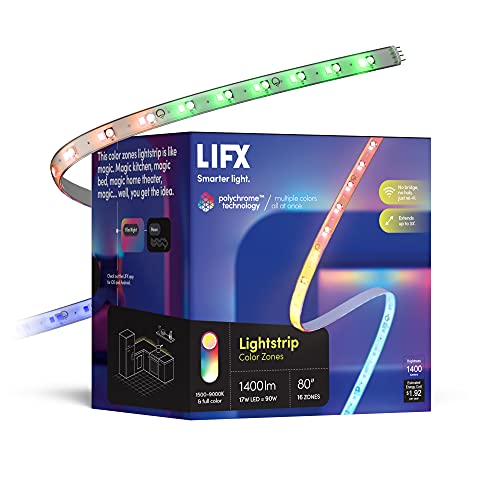
LIFX takes a different approach: every strip connects directly to Wi-Fi, so there is no hub or bridge to buy, hide, or configure. The 6.6-foot starter kit includes the controller and power supply, and it can be extended with additional sections up to about 32.8 feet for very large desks or full room outlines.
The headline feature is Polychrome technology, which paints multiple colors along the strip in addressable zones. In the LIFX app you can apply gradients, animated effects, and schedules, and the strip works with Alexa, Google Home, and Siri shortcuts. For a single desk, 6.6 feet is enough for a monitor backlight plus a desk-edge run.
Brightness is a genuine strength here; LIFX strips are among the more luminous options in this class, so they hold up in daylight rooms where weaker strips wash out. Setup is app-driven and occasionally takes a couple of attempts on busy networks, but once connected the strip behaves like any other smart light in your home.
Specs
| Spec | Detail |
|---|---|
| Length | 6.6 ft, extendable to 32.8 ft |
| Color format | Polychrome multicolor zones |
| Control | LIFX app, voice |
| Connectivity | Wi-Fi, no hub required |
| Voice assistants | Alexa, Google Home, Siri |
| Kit contents | Strip, controller, power supply |
DAYBETTER LED Strip Lights 32.8ft (2 Rolls of 16.4ft)
DAYBETTER is the value play for big desks and whole-room outlines. The kit ships as two 16.4-foot rolls totaling 32.8 feet, driven from one adapter, with a 44-key infrared remote and app control. That length covers an L-shaped desk, a desk plus shelving, or a full monitor-and-desk perimeter without buying extensions.
You give up the segmented RGBIC effects of the Govee; this strip shows one color at a time along its length, with the usual modes such as fade, jump, and music-reactive flashing through the built-in microphone. For bias lighting behind monitors and a single accent color under a desk edge, that is honestly all most people use day to day.
Installation is straightforward adhesive mounting, and the strip can be cut at marked intervals. The remote needs line of sight to the receiver, and app control depends on keeping the controller within Wi-Fi or Bluetooth range depending on mode. Judged purely on coverage per purchase, though, this is the easiest way to light a large home office desk setup.
Specs
| Spec | Detail |
|---|---|
| Length | 32.8 ft total, 2 rolls of 16.4 ft |
| Color format | RGB, single color per run |
| Control | App and 44-key infrared remote |
| Power | 12V plug-in adapter |
| Special modes | Music sync, fade, timer |
| Cutting | Cuttable at marked points |
Lepro S1 AI LED Strip Lights 16.4ft

Lepro’s S1 is built around convenience. It is a 16.4-foot RGB strip with addressable IC control, so it can produce chasing rainbow effects and segmented color designs that basic RGB strips cannot. There is no remote in the box; everything runs through the Lepro app over Wi-Fi and Bluetooth.
The differentiator is the app’s AI lighting designer, which generates scenes from descriptions and learns the styles you pick. In practice it removes the fiddling from getting a desk to look good: choose a mood, apply a generated palette, then adjust brightness. Music sync and scheduling are included, and the strip responds to Alexa and Google Assistant through its Wi-Fi connection.
Because control is app-only, this is a poor fit for anyone who wants a physical remote on the desk, and guests will not be adjusting your lights. For a single user who lives in the app anyway, the S1 delivers effects that normally require a more expensive RGBIC strip, in a simple single-roll package sized right for desks.
Specs
| Spec | Detail |
|---|---|
| Length | 16.4 ft |
| Color format | RGB with IC segment effects |
| Control | Lepro app only, no remote |
| Connectivity | Wi-Fi 2.4 GHz and Bluetooth |
| Voice assistants | Alexa, Google Assistant |
| Special modes | AI scene design, music sync |
Who Should Skip It
Skip strip lights entirely if your desk faces a window and you work mostly in daylight; you will rarely switch them on. Renters who cannot risk adhesive residue should look at clip-on light bars instead. If you need bright, neutral task lighting for paperwork or sketching, a proper desk lamp outperforms any strip. And if your workspace is a shared or client-facing office, animated color effects may read as a distraction rather than an upgrade.
FAQ
Where is the best place to mount a strip on a desk?
The rear edge of the desk, facing the wall, is the most popular spot because it creates a soft halo and hides the strip itself. Under the front edge works for a downward glow, and the back of a monitor provides bias light that eases eye strain during evening work.
Can I cut an LED strip to fit my desk?
Yes. Nearly all of these strips can be cut at clearly marked points, usually every few inches. Measure carefully first, because a cut section cannot be reattached without solderless connectors, and cutting outside the marked points can disable the section beyond the cut.
Do LED strips use much power?
Very little. A typical desk-length strip draws roughly the power of a small LED bulb, and far less than the monitor it sits behind. Running one for a full workday costs a negligible amount and produces almost no heat at the desk surface.
Will a smart strip work during an internet outage?
Usually, yes for basic functions. Strips with a physical control box or remote keep working locally, and most remember their last setting. App features, voice control, and schedules may pause until the connection returns, depending on the brand.
Final Verdict
For a single purchase that suits most home office desks, choose the Govee RGBIC 16.4ft: it combines generous length, segmented color, and reliable app and voice control. Philips Hue is the upgrade for existing Hue homes, LIFX is the hub-free alternative with strong brightness, DAYBETTER wins on sheer coverage for large setups, and the Lepro S1 is the low-effort option for app-driven scenes. Any of the five will make a desk feel more deliberate; match the control style to how you actually work.