Key takeaways
- Back up work files with the best external hard drives for home office use, comparing capacity, USB speed, encryption, backup software, and rugged builds.
A home office runs on files that cannot be replaced: client work, tax records, photo archives, and years of documents that exist nowhere else. An external hard drive remains the simplest and most spacious way to protect them, giving you terabytes of local backup storage that works without a subscription, a network connection, or an upload queue. Plug one in, run your backup, and your data survives a failed laptop drive or an accidental deletion.
The five drives below are all bus-powered portables that draw power from the USB cable, so they need no wall adapter and can move between your desk, a laptop bag, and a drawer. They range from a rugged drive built to survive travel to slim everyday models with hardware encryption and bundled backup software. The notes after the quick answer explain how to choose capacity and which features actually matter for office work.
As an Amazon Associate, we earn from qualifying purchases.
Quick Answer
The WD My Passport 5TB is the best default for most home offices, pairing large capacity with password protection and backup software in a slim case. Choose the LaCie Rugged Mini 5TB if the drive will travel or live in a bag, and the Toshiba Canvio Basics 4TB if you want simple plug-and-play storage with no software or encryption to manage.
How to Choose
Capacity comes first. Add up the size of everything you plan to back up, then buy at least twice that much space so the drive can hold multiple backup generations and a few years of growth. For most home offices, 4TB to 5TB is the practical sweet spot: enough for full computer backups, large media libraries, and archived project folders, in a single portable drive.
Speed is the second consideration, and here expectations should be modest. Portable hard drives transfer at roughly 100 to 130 megabytes per second over USB, which is fine for scheduled overnight backups and occasional large copies but slow for daily work with huge files. Every drive here uses USB 3.0 or faster, so the port is never the bottleneck; the spinning platter is. If you regularly move video projects or virtual machines, an external SSD is the better tool, and these drives should handle backup duty instead.
Security features separate the models. Some drives offer 256-bit AES hardware encryption with password protection, which matters if the drive holds client data or financial records and might leave the house. Others skip encryption entirely for simplicity. Decide honestly whether the drive will travel; a drive that never leaves a locked office needs encryption less than one that rides in a laptop bag.
Finally, look at the software and the build. Bundled backup utilities can automate scheduled backups on Windows, while Mac users may need to reformat the drive or rely on Time Machine. A metal enclosure feels sturdier and sheds heat, a ruggedized shell survives drops and rain, and a slim plastic case disappears into a drawer.
WD My Passport 5TB Portable Hard Drive

The My Passport is the drive most home offices should start with. The 5TB capacity holds complete backups of several computers plus years of archived files, yet the case is slim enough to slide into a drawer or laptop sleeve. It connects over USB 3.2 Gen 1 and ships formatted for Windows, with a downloadable driver available for Mac use.
Password protection with 256-bit AES hardware encryption is built in, so the drive can lock itself when unplugged and unlock on your computer with WD’s software. The bundled WD Discovery and backup utilities handle scheduled, automatic backups without third-party tools, which makes it easy to set up a set-and-forget routine. The model number for this 5TB black version is WDBPKJ0050BBK-WESN. For a desk-bound backup drive that also travels safely when needed, this is the most balanced package in the guide.
Specs
| Spec | Detail |
|---|---|
| Capacity | 5TB |
| Model | WDBPKJ0050BBK-WESN |
| Interface | USB 3.2 Gen 1 |
| Encryption | 256-bit AES hardware encryption |
WD My Passport Ultra 5TB Portable Hard Drive
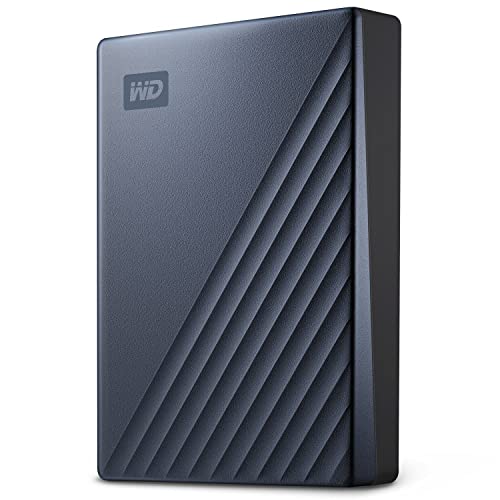
The My Passport Ultra takes the same formula as the standard My Passport and upgrades the parts you touch. A metal enclosure replaces the plastic shell, giving the drive a sturdier feel and a more professional look on the desk, and the connector moves to USB-C, which suits modern laptops that have dropped USB-A ports entirely. An adapter is included for older machines.
Capacity is the same roomy 5TB, and the security story matches too: password protection backed by 256-bit AES hardware encryption, plus WD’s backup and device management software for scheduled protection. This blue 5TB version carries the model number WDBFTM0050BBL-WESN. Choose the Ultra if your computer is USB-C only, if the drive will sit visibly on your desk rather than in a drawer, or if you prefer the reassurance of a metal case.
Specs
| Spec | Detail |
|---|---|
| Capacity | 5TB |
| Model | WDBFTM0050BBL-WESN |
| Interface | USB-C, USB 3.2 Gen 1 |
| Enclosure | Metal |
Seagate Portable 5TB External Hard Drive

Seagate’s Portable drive is the straightforward workhorse of the group. The 5TB model, STGX5000400, offers simple drag-and-drop storage over USB 3.0 with no software to install and no setup beyond plugging in the cable. It works with Windows and Mac computers, though Mac users who want to use it with Time Machine will reformat it first, as with most drives sold for both platforms.
What it does not offer is hardware encryption or an included backup suite, so it suits offices that already have a backup routine through their operating system or a third-party tool. The compact case is plain and light, designed to be carried rather than displayed. The 5TB version is the one that makes sense for whole-computer backups. If your priority is maximum space in a simple package from a major storage brand, this drive delivers exactly that.
Specs
| Spec | Detail |
|---|---|
| Capacity | 5TB |
| Model | STGX5000400 |
| Interface | USB 3.0 |
| Setup | Plug and play, drag and drop |
Toshiba Canvio Basics 4TB Portable Hard Drive
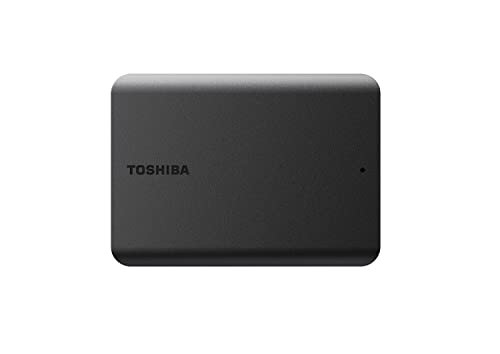
The Canvio Basics is the minimalist option: a matte black drive with a USB 3.2 Gen 1 connection, no bundled software, no encryption, and nothing to configure. It arrives formatted in NTFS for Windows and works immediately; Mac users can reformat it in seconds. For an office that uses operating-system backup tools and wants a drive that behaves like a big, quiet folder, that simplicity is the point.
Capacity is 4TB rather than 5TB, which still covers full backups of most home office computers with room for archives, and the slightly smaller size keeps this model, HDTB540XK3CA, easy to store. Buyers who need password protection should look at the WD models above, but buyers who value a clean, no-fuss drive for scheduled backups will find the Canvio Basics easy to live with.
Specs
| Spec | Detail |
|---|---|
| Capacity | 4TB |
| Model | HDTB540XK3CA |
| Interface | USB 3.2 Gen 1 |
| Finish | Matte black |
LaCie Rugged Mini 5TB Portable Hard Drive
The Rugged Mini is built for the drives that leave the desk. Its orange rubber sleeve and internal shock mounting protect against drops of up to 1.2 meters, and the sealed design resists rain, dust, and pressure that would finish a standard portable drive. Photographers and field workers have carried this line for years, and it suits any home office worker who backs up at multiple locations or keeps an off-site copy in a bag or car.
Under the armor it is a conventional 5TB USB 3.0 drive, model STJJ5000400, with transfer speeds in the usual portable hard drive range, up to about 130 megabytes per second. It includes LaCie’s backup software and a warranty backed by data recovery services, which adds a safety net if the worst happens. The rugged shell makes it thicker than the slim drives above, but for a backup that travels, the protection is worth the bulk.
Specs
| Spec | Detail |
|---|---|
| Capacity | 5TB |
| Model | STJJ5000400 |
| Interface | USB 3.0 |
| Protection | Shock, rain, and dust resistant |
Who Should Skip It
Skip a portable hard drive if your daily work involves moving very large files several times a day, because an external SSD will do the same job many times faster. Skip these drives if your backup strategy is already fully cloud-based with versioning you trust, or if your office needs shared network storage that several computers can reach at once, which calls for a NAS instead. And if your total data is small enough to fit comfortably on a flash drive, a 5TB hard drive is simply more hardware than the job requires.
FAQ
How big a drive do I need for a full computer backup?
Buy at least twice the capacity of the data you are backing up. A laptop with 600GB of files deserves a 2TB drive at minimum, and most home offices are better served by 4TB or 5TB so the drive can keep several backup generations and absorb years of new files without being replaced.
Can I use one of these drives with both Windows and Mac?
Yes, if you format it as exFAT, which both systems read and write. Out of the box, most of these drives are formatted for Windows, and Mac backup with Time Machine requires an APFS or HFS+ format instead. Pick one role per drive: cross-platform file shuttle in exFAT, or dedicated backup drive in your system’s native format.
Is hardware encryption worth having?
If the drive holds client files, financial records, or anything you would not want a stranger to read after a loss or theft, yes. Hardware encryption with a password means a found drive reveals nothing. If the drive never leaves a secure office and holds only replaceable media, it is a nice extra rather than a necessity.
How long do portable hard drives last?
Treat any single drive as temporary. Mechanical drives typically serve three to five years in backup duty, and any drive can fail without warning. Keep two copies of important data on separate devices, and replace a backup drive if it starts clicking, disconnecting, or failing health checks.
Final Verdict
The WD My Passport 5TB is the default recommendation for its mix of capacity, encryption, and backup software, while the My Passport Ultra adds USB-C and a metal case for modern laptops. The Seagate Portable and Toshiba Canvio Basics strip the formula down to simple, spacious storage, and the LaCie Rugged Mini protects the drive that has to travel. Choose capacity first, encryption second, and any of these five will quietly guard your office files for years.