Key takeaways
- Compare the best desk microphone stands for calls, podcasts, and streaming, with boom reach, clamp fit, cable routing, and mic weight support explained.
A desk microphone stand does far more than hold a microphone. It decides how close the mic sits to your mouth, how much desk space you give up, and how much keyboard noise and desk vibration reach your calls and recordings. In a home office, where one desk handles video meetings, podcasts, and streaming, the right stand keeps the microphone floating in the ideal spot while the work surface stays clear for a keyboard and notebook.
The five stands below cover the main styles worth considering: a premium parallelogram arm, two upgraded scissor arms, a low-profile arm that tucks under a monitor, and a simple scissor arm for lighter microphones. All five clamp to the desk instead of standing on it, so none eats into your working area, and all use the standard thread sizes found on common USB and XLR microphones.
As an Amazon Associate, we earn from qualifying purchases.
Quick Answer
The RØDE PSA1+ is the strongest all-round pick, with smooth damped movement, tidy cable channels, and support for most home office microphones. Choose the TONOR T40LP if your monitor sits low and you need an arm that stays out of the way, and the FIFINE CS1 if you run a lightweight USB mic and want the simplest possible setup.
How to Choose
Start with the mount. Most desk arms use a C-clamp that grips the edge of the desktop, so check the maximum desk thickness the clamp accepts and confirm the edge is free of drawers or cable trays where the clamp needs to bite. Some arms also include a threaded grommet mount that passes through a drilled hole, which looks cleaner and frees the edge entirely. If your desk has a glass top or a very thick edge, measure before ordering.
Next, match the arm to your microphone weight. Every boom arm is balanced for a load range, and that range has to cover the microphone plus its shock mount and any pop filter you add. A heavy dynamic broadcast microphone on an arm rated for light condensers will slowly droop, while a very light USB microphone on a stiff arm can spring upward. Check the rated load in the listing and weigh your full setup, not just the microphone body.
Then measure reach and clearance. Note the distance from the clamp point to where you actually sit, and compare it with the arm’s extended reach. If your monitor sits directly in front of you, a standard scissor arm will arc over or around it, while a low-profile arm runs underneath the screen and keeps the microphone below your line of sight, which matters for video calls.
Finally, think about cables and movement noise. Arms with internal springs and covered joints move quietly when you adjust them mid-call, while basic scissor arms with exposed springs can creak and transmit a twang through the recording. Integrated cable channels or clips keep the microphone cable from dangling across the desk, and a rotating base lets you swing the mic aside easily.
RØDE PSA1+ Professional Studio Arm
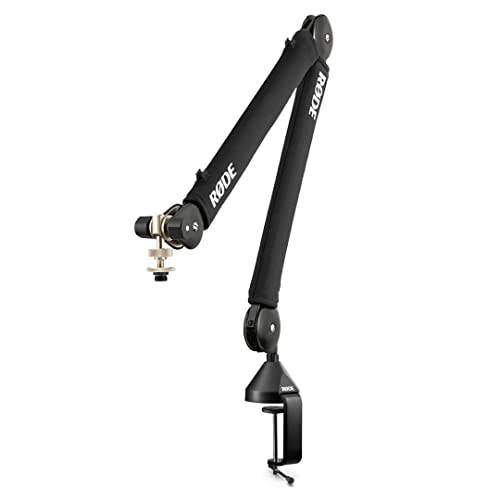
The PSA1+ is the arm to pick when you adjust your microphone position often and want every movement to feel controlled. Its parallelogram spring design keeps the microphone at a constant angle as you raise or lower it, and the internal springs are fully damped, so repositioning during a live call or recording session stays silent. The arm also rotates a full 360 degrees at the base, so you can swing the microphone aside when it is not needed.
Cable management is built in rather than added on. Channels along the arm with matching clips hold the microphone cable neatly from the clamp to the mic, so nothing drapes across your keyboard. The package includes both a desk clamp and a threaded desk mount for a permanent through-desk install. The PSA1+ supports a wide range of microphone weights, covering everything from compact USB condensers to heavier dynamic broadcast microphones with shock mounts.
Specs
| Spec | Detail |
|---|---|
| Arm type | Parallelogram spring arm |
| Mount | Desk clamp and threaded mount |
| Cable routing | Integrated channels with clips |
| Rotation | 360-degree base rotation |
TONOR T20 Upgraded Mic Arm Stand

The TONOR T20 takes the familiar scissor-arm shape and fixes its usual weak points. The steel arm is rated for microphones up to 4.4 pounds, which covers heavy dynamic models with a shock mount fitted, and the desk clamp opens wide enough for desktops up to 2.36 inches thick. A longer reach than basic arms gives you more freedom to clamp it at the back corner of the desk and still pull the microphone close.
It arrives as a complete kit rather than a bare arm. The box includes a shock mount, a pop filter, a microphone clip, and cable ties, so a first-time buyer can mount a microphone and start recording without a second order. The upgraded springs hold position well once tension is set, and the arm folds flat against the desk edge when not in use. For a home office that doubles as a podcast corner, the T20 is the most complete package here.
Specs
| Spec | Detail |
|---|---|
| Arm type | Steel scissor boom arm |
| Max load | Up to 4.4 pounds |
| Clamp range | Desks up to 2.36 inches thick |
| Included extras | Shock mount, pop filter, mic clip |
TONOR T40LP Low Profile Mic Arm

The T40LP solves a specific and common problem: a standard boom arm arcs up and over your monitor, blocking part of the screen and putting the microphone in the camera frame. This low-profile design keeps the arm’s horizontal run low, sliding under most monitors so the microphone approaches from below and stays beneath your eye line on video calls. It is the natural choice for desks where the screen sits close and desk depth is limited.
Despite the slim profile, the arm still offers full positioning. It swivels at the base, the elbow and microphone end adjust for angle, and a concealed channel routes the cable along the arm so the low line stays clean. Streamers and remote workers on camera all day will appreciate how completely this arm disappears from view while keeping the microphone close to the mouth for clear call audio.
Specs
| Spec | Detail |
|---|---|
| Arm type | Low-profile boom arm |
| Profile | Runs below monitor height |
| Cable routing | Concealed in-arm channel |
| Best for | Video calls and streaming |
FIFINE CS1 Boom Arm Mic Stand
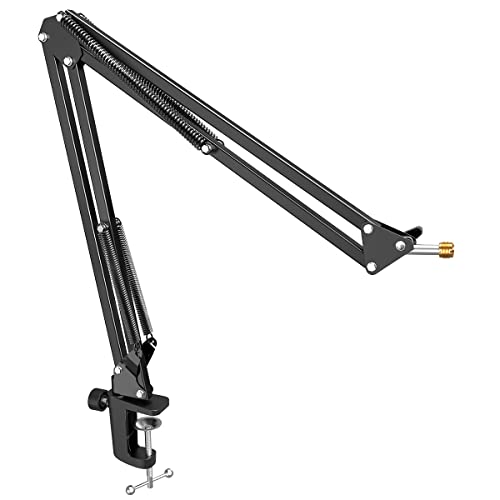
The FIFINE CS1 is a straightforward suspension scissor arm for people running a lighter microphone who want a tidy desk without overthinking the purchase. The spring-loaded arm adjusts with wing-style tension knobs at the joints, the desk clamp attaches in seconds, and a pop filter is included to tame plosives.
This arm suits the microphones it was designed around: FIFINE’s own USB models and similar light condensers from other brands. It is not the right tool for a heavy broadcast dynamic microphone, and the listing’s load guidance should be respected, because an overloaded arm droops. Within its intended range, though, it holds position reliably and folds away neatly. For a first home office microphone, the CS1 covers the essentials with the least fuss in this roundup.
Specs
| Spec | Detail |
|---|---|
| Arm type | Suspension scissor arm |
| Mount | Desk mounting clamp |
| Included extras | Pop filter |
| Best for | Lightweight USB microphones |
InnoGear Microphone Arm Stand
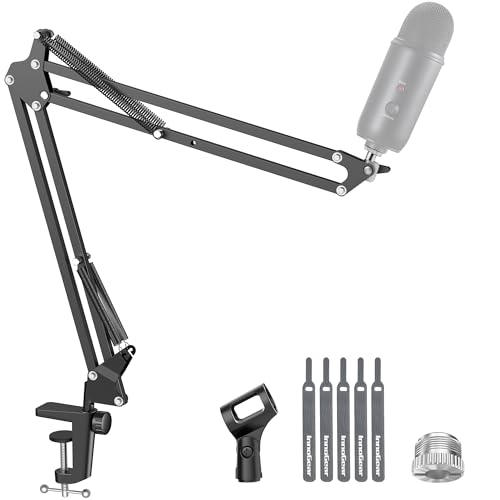
InnoGear’s boom arm is the long-running budget scissor design that appears in countless home studios, and it remains a sensible pick for light to midweight microphones. The steel arm is rated for loads up to about 3.3 pounds, which covers most USB condensers and lighter XLR models with a clip or shock mount. The package includes a microphone clip, a 3/8-inch to 5/8-inch thread adapter for wider compatibility, and a sturdy table mounting clamp.
The trade-offs are the expected ones at this level: external springs can produce a faint spring sound if you move the arm while recording, and cable management is left to you. In return you get a proven mechanism that sets up in minutes, folds flat when not in use, and does the job without demanding attention or desk space.
Specs
| Spec | Detail |
|---|---|
| Arm type | Steel scissor boom arm |
| Max load | Up to about 3.3 pounds |
| Adapter | 3/8-inch to 5/8-inch included |
| Mount | Table mounting clamp |
Who Should Skip It
Skip a clamp-on boom arm entirely if your desk has no accessible edge, a glass top, or a standing-desk frame that leaves nowhere for a clamp to grip; a weighted desktop stand or a floor stand will serve you better. You can also skip this category if you use a headset microphone for calls and never record standalone audio. Finally, if your microphone and shock mount exceed the highest load ratings here, look at a heavy-duty broadcast arm instead.
FAQ
Will these arms fit my microphone?
Almost certainly, yes. Nearly all home office microphones use either a 3/8-inch or 5/8-inch threaded mount, and the arms here either match those threads directly or include an adapter. Check whether your microphone needs a clip or a shock mount, since some models screw straight onto the arm while others hang in a mount.
Can a boom arm damage my desk?
A clamp spreads its pressure over a padded jaw, so damage is unlikely on a solid wood or laminate desk. Avoid overtightening, add a thin pad on delicate finishes, and never clamp onto a glass desktop.
Why does my microphone keep drifting or drooping?
Drooping almost always means the load is too heavy for the arm’s springs or the joint tension needs tightening. Remove any extra accessories, confirm the total weight sits inside the rated range, and adjust the tension knobs. A microphone that springs upward has the opposite problem: it is too light for the arm’s minimum load.
Is a low-profile arm better for video calls?
For on-camera work, usually yes. A low-profile arm like the TONOR T40LP keeps the microphone below the screen and out of the camera frame while still placing it close to your mouth.
Final Verdict
For most home office desks, the RØDE PSA1+ is the arm to buy once and keep, thanks to its quiet damped movement, built-in cable channels, and wide microphone weight range. The TONOR T20 is the best complete kit for heavier microphones, the T40LP wins for clean on-camera setups, and the FIFINE CS1 and InnoGear arm cover lighter microphones and simpler desks. Match the rated load to your microphone, check your clamp space, and any of the five will serve you well.