Key takeaways
- Compare the best power strip towers for home office desks, with outlet counts, USB charging, surge protection ratings, and cord lengths for every setup.
A typical home office desk hides an embarrassing number of plugs: monitor, laptop charger, dock, desk lamp, phone charger, speakers, and a printer waiting in the corner. A flat power strip forces all of those bricks into a single row, where wide adapters block neighboring outlets and the whole tangle slides around on the floor. A power strip tower takes the opposite approach, stacking outlets vertically on a small footprint so plugs enter from several directions and nothing gets covered up.
Towers also keep the charging station visible and reachable on the desktop instead of buried behind a desk leg. This guide compares five towers that suit desk work, from a 12-outlet charging hub to a compact model with a wireless charging top, and explains how outlet count, surge protection, and cord length should drive the choice.
As an Amazon Associate, we earn from qualifying purchases.
Quick Answer
The JACKYLED Power Strip Tower with 12 outlets and 6 USB ports is the best all-round choice for a busy desk, with room for every plug plus phone charging. Pick the BESTEK tower if a wireless charging top sounds useful, and the TAGZILO tower when a long 10 ft cord is needed to reach a distant wall outlet.
How to Choose
Count outlets honestly. List every device that lives at the desk, including chargers that rotate through, then add two spare outlets for future gear. Most home offices land between 8 and 12 AC outlets. More important than the raw count is the layout: towers spread outlets across multiple faces, so bulky laptop bricks and wall warts rarely block a neighbor, which is the main advantage over a flat strip.
Surge protection is rated in joules, and higher numbers absorb more energy before the protection wears out. A rating around 1000 joules is reasonable for lamps and chargers, while a tower feeding a desktop PC, monitors, and a NAS deserves 1800 joules or more. Look for a protected indicator light, an overload switch that doubles as a reset, and a safety listing such as ETL or UL, which means the design passed independent testing.
USB ports save outlet space. A tower with several USB-A ports handles older cables, while a USB-C port with Power Delivery around 20W charges a phone or tablet at a useful speed and can top up earbuds and accessories. Total USB output matters when several ports run at once, so check whether the wattage is shared.
Cord length decides placement. A 5 or 6.5 ft cord suits a desk against the same wall as the outlet. A 10 ft cord, or a retractable cord that spools into the base, helps with standing desks and room layouts where the outlet sits behind furniture. A flat plug is worth having when the wall outlet hides behind a cabinet or couch.
JACKYLED Power Strip Tower, 12 Outlets and 6 USB Ports
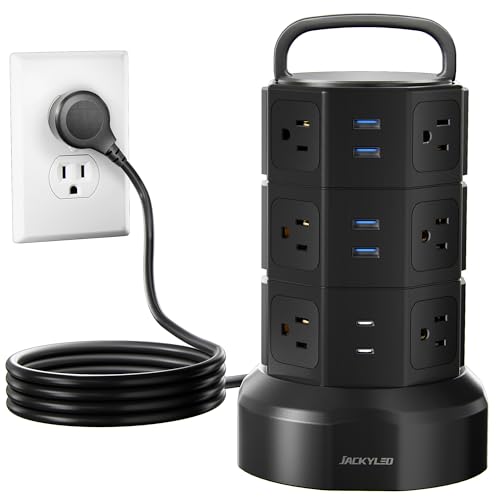
This is the tower for the desk that powers everything. Twelve AC outlets face outward in stacked rows, and six USB ports, including two USB-C, sit ready for phones, tablets, and accessories. The combined capacity removes the need for a second strip, which is where most desk cable messes begin.
Surge protection is rated at 1050 joules, and the heavy-duty 6.5 ft cord uses 16AWG wiring rated for the tower’s 1625W, 13A ceiling. An overload protection switch guards the whole unit. For a workstation with dual monitors, a desktop PC, and a rotation of chargers, this JACKYLED is the most complete single purchase in the group.
Specs
| Feature | Detail |
|---|---|
| AC outlets | 12 |
| USB ports | 6 total, including 2 USB-C |
| Surge protection | 1050 joules |
| Cord length | 6.5 ft, 16AWG heavy duty |
| Max load | 1625W / 13A |
BESTEK Power Strip Tower with Wireless Charger

The BESTEK tower adds a trick the others lack: a wireless charging pad built into the top. Set a compatible phone down on the lid and it charges while the eight AC outlets around the sides handle the desk hardware. Two USB-A ports and a USB-C port with 20W Power Delivery cover wired charging at the same time.
Surge protection is the strongest here at 2100 joules, and the unit is ETL listed, which matters for a device that stays plugged in around the clock. The tower stands just 5.7 inches tall on a 4.8 inch square base, so it tucks into a desk corner easily. The 5 ft cord with a flat plug suits desks positioned right against the wall outlet.
Specs
| Feature | Detail |
|---|---|
| AC outlets | 8 |
| USB ports | 2 USB-A, 1 USB-C PD 20W |
| Wireless charging | Yes, pad built into the top |
| Surge protection | 2100 joules, ETL listed |
| Cord length | 5 ft, flat plug |
JACKYLED Tower Surge Protector, 8 Outlets and 4 USB Ports with Retractable Cord

The second JACKYLED in this guide solves a different problem: cord management. Its power cord retracts into the base, so the tower can sit close to a wall outlet without a coil of spare cable looping across the floor, then extend when the desk moves or the tower relocates to another room.
Eight AC outlets and four USB ports, two of them USB-C, cover a standard laptop-based desk with room to spare. Surge protection matches its bigger sibling at 1050 joules, with the same 1625W, 13A rating. Anyone whose desk layout changes often, or who shares one tower between a desk and a workbench, will appreciate the self-storing cord.
Specs
| Feature | Detail |
|---|---|
| AC outlets | 8 |
| USB ports | 4 total, including 2 USB-C |
| Surge protection | 1050 joules |
| Cord | Retractable, stores inside the base |
| Max load | 1625W / 13A |
TAGZILO Power Strip Tower with 1800J Surge Protection

Reach is the headline here. The TAGZILO tower ships with a 10 ft extension cord, double the length of most desktop towers, which makes it the natural pick when the only free wall outlet sits across the room or behind a bookshelf. Eight AC outlets wrap the body, and USB charging includes a USB-C port with 20W Power Delivery for fast phone top-ups.
Surge protection is rated at 1800 joules, a step above basic towers and a sensible match for a home office PC and monitor pair. The white finish blends into light-colored desks and dorm rooms. For a standing desk that rises and falls through the day, the long cord also leaves enough slack to avoid tugging at full height.
Specs
| Feature | Detail |
|---|---|
| AC outlets | 8 |
| USB ports | USB-A plus USB-C PD 20W |
| Surge protection | 1800 joules |
| Cord length | 10 ft |
| Color | White |
kakyanill Power Strip Tower, 9 AC Outlets and 8 USB Ports

The kakyanill tower leans into USB charging harder than anything else here: eight USB ports, four of them USB-C, alongside nine AC outlets. A desk that charges a phone, tablet, earbuds, watch, and a desk lamp’s battery pack can retire several wall adapters at once.
The 6 ft cord retracts for storage, and the tower carries surge protection with an overload switch for the combined load. The tall, slim profile fits the gap between a monitor and a desk edge where a wide strip would not. Households with several people charging at one shared desk, or a family homework station, get the most from this layout.
Specs
| Feature | Detail |
|---|---|
| AC outlets | 9 |
| USB ports | 8 total, including 4 USB-C |
| Surge protection | Yes, with overload switch |
| Cord | 6 ft, retractable |
| Total ports | 17 |
Who Should Skip It
Anyone who needs to power high-draw appliances such as space heaters, kettles, or laser printers should skip desktop towers and use a wall outlet or a heavy-duty strip rated for the load, since most towers cap out near 1625W shared across every socket. Travelers should also look elsewhere; towers are bulky in a bag, and models with surge protection are not suitable for cruise ships. Finally, a desk with only three or four plugs gains little over a simple compact strip.
FAQ
How many joules of surge protection does a home office need?
For chargers, lamps, and small electronics, around 1000 joules is adequate. A tower protecting a desktop computer, monitors, and external drives should offer 1800 joules or more, and the unit should be replaced after a major surge event or when its protection indicator light goes out.
Can a power strip tower sit on the desk safely?
Yes, that is what towers are designed for. Keep the vents clear, avoid covering the tower with papers or fabric, and stay within the total wattage rating printed on the base. Models with a safety listing such as ETL or UL have passed independent electrical testing.
Do USB ports on a tower charge as fast as a wall adapter?
It depends on the port. A USB-C port with 20W Power Delivery charges modern phones at a genuinely useful speed. Basic USB-A ports are slower and best for accessories, overnight charging, and small gadgets. When several USB ports run together, many towers share a total output limit, so speeds can drop.
What cord length should a standing desk use?
A standing desk needs enough slack for the full rise from sitting to standing height, plus the run to the wall outlet. A 10 ft cord, or a retractable cord that can extend as needed, prevents the tower from tugging or lifting at maximum height. Mounting the tower under the desktop also keeps the cable path short and tidy.
Final Verdict
The 12-outlet JACKYLED tower is the easiest recommendation for a fully loaded desk, while its retractable-cord sibling suits anyone tired of coiled spare cable. The BESTEK earns its place with the strongest surge rating and a wireless charging top, the TAGZILO solves the far-away outlet problem with its 10 ft cord, and the kakyanill is the charging hub for USB-heavy households. Count the plugs, match the cord to the room, and choose the highest surge rating the shortlist allows.