Key takeaways
- Learn how to choose a desk green screen for home office video calls, from pull-up panels to chair-mounted backdrops, and find the right fit for your space.
- Top Pick: Elgato Green Screen XL
- Runner-up: Neewer Green Screen Backdrop Pull-Up Style
- Also consider: Emart Green Screen Stand 79 x 71 Inches
A tidy background makes a real difference on video calls, yet most home offices double as living rooms or bedrooms that are hard to keep camera-ready. A desk green screen gives your camera a clean, solid surface to replace with a virtual background, so the room behind you disappears without a redecoration.
Choosing one is not as simple as grabbing the cheapest green cloth. Size, setup style, and storage all matter when the screen has to live beside a desk rather than in a photo studio. This guide covers the main types, the features worth attention, and five green screens that suit a home office.
As an Amazon Associate, we earn from qualifying purchases.
Quick Answer
Pick a pull-up green screen for the fastest setup and the cleanest look, since it rolls out of its own case and locks upright in seconds. Choose a collapsible pop-up backdrop if you need the lightest option for a shared room, and a chair-mounted screen if floor space is tight. Measure your camera frame first, then match the screen width to it.
Elgato Green Screen XL

The Elgato Green Screen XL is the premium pull-up option here, built for people who take video calls all day. Its extra-wide panel covers a broad camera frame, so it suits wide-angle webcams, two people sitting side by side, or anyone who gestures while talking. The wrinkle-resistant fabric keeps the surface smooth, since creases show up as uneven patches when software replaces the background.
Setup is the main appeal. The screen pulls up from its own hard case, locks at the height you want, and rolls away just as quickly when the call ends. The case doubles as the base, so there are no separate stands or clamps to assemble. At 13.6 pounds it is heavier than a fabric pop-up, so it suits a fixed desk spot rather than daily travel, but the collapsed case stores neatly under a desk or against a wall.
Specs
| Feature | Detail |
|---|---|
| Type | Pull-up collapsible panel |
| Screen size | 78.75 x 71.65 inches |
| Material | 100 percent polyester |
| Weight | 13.6 pounds |
| Collapsed size | 82.7 x 4.7 x 4.7 inches |
| Included | Green Screen XL and quick start guide |
Neewer Green Screen Backdrop Pull-Up Style

The Neewer pull-up green screen brings the same roll-out convenience as premium panels at a mid-range position, making it a strong choice for a first green screen. Its auto-locking frame holds the fabric at your chosen height, and a solid aluminum base keeps it steady on the floor behind your chair.
It collapses into its base, tucks beside a desk between calls, and deploys in seconds when a meeting starts. The size is not stated in the published listing, so measure your camera frame and compare it with the screen once it arrives, keeping the return window in mind if your setup needs a wider panel.
Specs
| Feature | Detail |
|---|---|
| Type | Pull-up collapsible panel |
| Frame | Auto-locking |
| Base | Solid aluminum |
| Fabric | Wrinkle-resistant |
| Color | Green |
| Size | Not stated |
Emart Green Screen Stand 79 x 71 Inches

The Emart green screen stand pairs a large pull-up panel with an adjustable tripod, giving you more control over placement than a floor-base design. The 79 by 71 inch screen is wide enough for broad camera angles and for presenters who move around during a call, and the auto-locking frame lets you set the height to match your seating position.
This design suits a home office where the screen needs to sit further from the desk, or where the floor behind the chair is uneven and a flat base would wobble. The tripod also makes it easy to angle the screen slightly, which can reduce glare from a nearby window or desk lamp. It is a mid-range option that trades a little setup time for flexibility, and a good fit if you sometimes record videos as well as joining calls.
Specs
| Feature | Detail |
|---|---|
| Type | Pull-up panel with tripod stand |
| Screen size | 79 x 71 inches |
| Frame | Auto-locking |
| Stand | Adjustable tripod |
| Design | Collapsible and portable |
| Color | Green |
Neewer Double-Sided Collapsible Backdrop
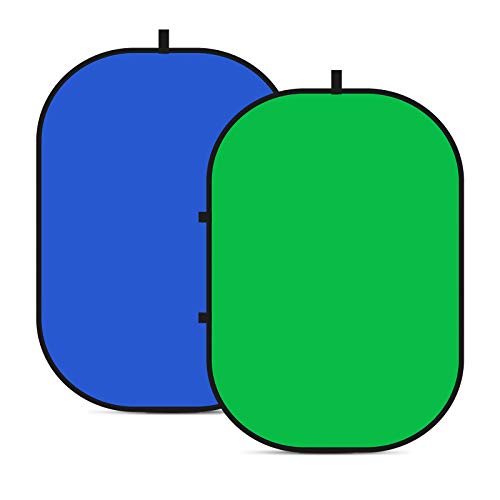
The Neewer double-sided collapsible backdrop is the budget-friendly pop-up option, and the lightest screen in this roundup. It opens from a folded disc into a 5 by 6.6 foot panel in a couple of seconds, with green on one side and blue on the other, so you can switch colors depending on your software or your clothing.
This is the screen to choose if you work from a shared room, a small apartment, or a desk that moves between locations. It weighs far less than a pull-up panel and costs less too, while still giving you a full-size background for seated video calls. The trade-off is that a pop-up panel can show gentle curves at the edges, and it needs a chair back, a stand, or a clip to hold it upright, since it has no base of its own.
Specs
| Feature | Detail |
|---|---|
| Type | Collapsible pop-up backdrop |
| Open size | 5 x 6.6 feet |
| Colors | Green and blue, double-sided |
| Frame | Pop-up, self-supporting when leaned |
| Storage | Folds into a compact disc |
| Material | Not stated |
Aiuca Portable Green Screen Chair 57 Inches

The Aiuca portable green screen chair is the chair-mounted option, designed for home offices where there is no floor space to spare behind the desk. The 57 inch double-sided green backdrop attaches to your office chair, so it moves with you and stays in frame even if you swivel or shift position. It folds down for storage and includes a stand.
Because it hangs on the chair rather than standing on the floor, this screen works in rooms where a pull-up panel would block a walkway or crowd a shared space. The double-sided green surface gives you a spare face if one side picks up a mark, and it packs into its bag in seconds after a call. It is a budget pick that solves the most common home office problem, which is simply having nowhere to put a full-size screen.
Specs
| Feature | Detail |
|---|---|
| Type | Chair-mounted foldable backdrop |
| Open size | 57 inches |
| Sides | Double-sided green |
| Mounting | Chair straps with included stand |
| Design | Foldable for storage |
| Color | Green |
How to choose
Start with your camera frame. Sit in your usual chair, open your video preview, and note how wide the background appears behind your head and shoulders. A screen narrower than that frame leaves the edges of your room visible, so pick a panel at least as wide as the frame, with a little extra on each side for movement.
Next, think about setup time and storage. A pull-up screen is fastest for daily calls because it lives in its own case and deploys in seconds, but it needs floor space behind your chair and a spot to store the case. A pop-up backdrop is lighter and cheaper, yet it needs something to lean on. A chair-mounted screen needs almost no floor space at all, though it only fits chairs with a back it can strap onto.
Material matters more than it seems. Wrinkle-resistant fabric gives chroma key software a smooth, even surface, while a creased cloth creates patches that flicker or fail to key out. Look for fabric described as wrinkle-resistant or chroma key tested, and store the screen flat or rolled rather than crumpled.
Finally, consider lighting. A green screen works best with soft, even light on the fabric and no harsh shadows, so position a lamp or window light to face the screen rather than shining from behind it.
Who should skip
A desk green screen is not for everyone. If you already use a plain wall as your background and your calls look fine, a screen adds setup time without adding much value. The same applies if your video software already replaces your background cleanly using its built-in blur or virtual background feature.
People with very small desks or shared workspaces should also think twice about a pull-up panel, which needs clear floor space behind the chair and can dominate a room. If your chair has no back, or a low back that cannot hold straps, a chair-mounted screen will not work either. In those cases a pop-up backdrop leaned against a wall, or simply tidying the visible background, may serve you better.
FAQ
Do I need a green screen for Zoom or Teams calls?
No, since both platforms offer virtual backgrounds and background blur without any extra gear. A green screen helps when those built-in features look messy, with flickering edges or parts of your room showing through. It gives the software a solid, even color to replace, which produces a cleaner result.
What size green screen do I need for a home office?
For a single person seated at a desk, a screen around 56 to 60 inches wide usually covers the camera frame, while a wider panel of 70 inches or more suits wide-angle webcams or two people on camera. Measure your video preview before buying.
Can I use a green screen with a laptop webcam?
Yes, since the keying happens in your video software rather than in the camera. Zoom, Teams, Google Meet, and OBS all support green screen mode. Just make sure the screen fills the frame behind you and that the fabric is lit evenly.
How do I store a green screen when I am not using it?
Pull-up screens collapse into their own case and can stand upright under a desk or in a closet. Pop-up backdrops fold into a flat disc that slides behind furniture or onto a shelf. Chair-mounted screens fold into a bag that fits in a drawer. Avoid crumpling the fabric, since creases make chroma keying harder.
Final verdict
For most home offices, a pull-up green screen is the best starting point because it sets up in seconds, stores in its own case, and gives software a smooth surface to key out. The Elgato Green Screen XL leads this roundup for anyone who wants the widest, most polished result, while the Neewer pull-up and the Emart tripod model offer the same convenience at a mid-range position.
If floor space is the limiting factor, skip the pull-up designs and look at the chair-mounted Aiuca or the pop-up Neewer double-sided backdrop instead. Both cost less, store almost anywhere, and still deliver a clean background for daily calls. Whichever type you choose, measure your camera frame first, pick a wrinkle-resistant fabric, and give the screen even light.