Our Short List of 3

- Best for: A student on a short rental who mainly writes, researches, and joins video calls.
- Display: 15.6-inch FHD display
- Processor: Intel Celeron N4500 dual-core processor
- Memory: 8GB RAM
- Storage: 128GB SSD plus 128GB eMMC

- Best for: A student who runs many tabs and applications at once and needs headroom for a full academic year.
- Display: 15.6-inch display, 1920 x 1080 resolution
- Processor: 13th Generation Intel Core i7-1355U
- Graphics: Intel Iris Xe Graphics
- Memory: 16GB DDR4-3200 MHz RAM

- Best for: A student who carries a laptop all day and wants a light, durable machine for everyday classes.
- Display: 15.6-inch FHD slim laptop display
- Processor: AMD Ryzen 3 7320U quad-core processor
- Memory: 8GB DDR5 RAM
- Storage: 256GB SSD
All 4 Picks at a Glance
| Product | Specs | Action |
|---|---|---|
| Lenovo IdeaPad 1 Student Laptop |
| Check price on Amazon |
| HP 15 Laptop PC 15-fd0099nr |
| Check price on Amazon |
| ASUS Vivobook Go 15 E1504FA-AB34 |
| Check price on Amazon |
 Dell Inspiron 15 3535 Touchscreen |
| Check price on Amazon |
Key takeaways
- Compare five durable, rental-friendly student laptops with strong battery life, solid keyboards, and enough memory for classes, research, and study.
Renting a laptop for a term or a school year is a different decision from buying one to keep for five years. A rental needs to survive daily carrying between lectures, shared flats, libraries, and part-time work, and it needs to be handed back in good working order. That means durability, a comfortable keyboard, a screen that stays readable in bright rooms, and enough memory and storage for coursework matter far more than a flashy finish or a feature that looks impressive in a shop window.
This guide is for students who are renting for a semester or an academic year, for parents arranging a machine for a student away from home, and for anyone who needs a dependable study laptop without a long-term commitment. Every laptop below was chosen from the name and specifications shown on its Amazon product page, with attention to the details that matter most during a rental: everyday performance, portability, connectivity, and a build that can cope with student life.
Quick Picks
As an Amazon Associate we earn from qualifying purchases
| Product | Best for | Key spec from title |
|---|---|---|
| Lenovo IdeaPad 1 Student Laptop | Light coursework and a tight rental term | 15.6-inch FHD display, 8GB RAM, 128GB SSD plus 128GB eMMC |
| HP 15 Laptop PC 15-fd0099nr | Heavy multitasking across many tabs and documents | Intel Core i7-1355U, 16GB DDR4 RAM, 512GB SSD |
| Acer Aspire 3 A315-24PT-R0UX | Touchscreen note-taking and long study sessions | AMD Ryzen 5 7520U, 16GB LPDDR5, 512GB NVMe SSD |
| ASUS Vivobook Go 15 E1504FA-AB34 | Carrying every day in a backpack | AMD Ryzen 3 7320U, 8GB DDR5 RAM, 256GB SSD |
| Dell Inspiron 15 3535 Touchscreen | Shared use and demanding group projects | AMD Ryzen 7 7730U, 16GB RAM, 512GB SSD |
How to Choose
Match the processor to real student work
A processor decides how smoothly a laptop handles the work students actually do, so start with the workload rather than the brand name. Writing essays, building slide decks, joining video calls, and keeping a dozen browser tabs open are light to moderate tasks, and a modern entry-level processor can handle them without drama. Coding assignments, large spreadsheets, photo editing, and running virtual machines are heavier, and they benefit from more cores and a stronger chip. Check the processor model in the Amazon title, then picture a normal study day: research and writing need modest power, while compiling code or editing media calls for a stronger chip.
Get enough memory and storage for a full term
Memory keeps several applications open at once, while storage holds lecture recordings, readings, assignments, and software for the whole rental period. Eight gigabytes of RAM is a workable starting point for writing, browsing, and video calls, and it suits a short rental where the workload stays light. Sixteen gigabytes gives far more headroom when a student runs a browser with many tabs, a word processor, and a video call at the same time. For storage, a small drive fills quickly once slides and project files accumulate, so a 256GB solid-state drive is a sensible minimum and 512GB is safer for a full academic year.
Check the screen, keyboard, and weight before anything else
Students spend hours looking at the screen and typing, so comfort is not a luxury during a rental. A 15.6-inch Full HD display shows a full page of text and a browser side by side without constant scrolling, and an anti-glare finish helps in bright lecture halls and near windows. Touchscreen models add a direct way to scroll, annotate, and navigate, which some students love for note-taking. The keyboard should feel solid, with keys that travel cleanly and a layout that does not cramp the hands during long essays. Weight matters just as much: a machine near three and a half pounds is easy to carry all day, while a heavier laptop becomes a burden by the third lecture.
Look for ports, Wi-Fi, and a build that survives student life
A rental laptop meets more chargers, projectors, headphones, and memory cards than a desk-bound machine ever will, so connectivity deserves a close look. Wi-Fi 6 helps in crowded halls of residence and libraries where many devices share one network, and Bluetooth makes wireless headphones and a mouse simple to pair. USB-C, USB-A, and HDMI ports cover charging, external drives, and connecting to a classroom display or a second monitor in a shared flat. A webcam with a privacy shutter is a useful touch for video calls in shared rooms. Build quality matters just as much for a machine that will be returned: a sturdy hinge and a firm lid cope better with daily packing and unpacking.
The 5 Best Options
Lenovo IdeaPad 1 Student Laptop
- Best for: A student on a short rental who mainly writes, researches, and joins video calls.
- Display: 15.6-inch FHD display
- Processor: Intel Celeron N4500 dual-core processor
- Memory: 8GB RAM
- Storage: 128GB SSD plus 128GB eMMC
A student on a short rental who mainly writes, researches, and joins video calls.
Storage fills faster than on larger-drive models, so check how much space lecture files and software will need.
The Lenovo IdeaPad 1 Student Laptop is a straightforward choice for a student who needs a reliable machine for writing, research, and video calls during a short rental. Its 15.6-inch Full HD display gives plenty of room for essays and lecture slides, and the numeric keypad helps with data entry and coursework that involves numbers. With 8GB of RAM and solid-state plus eMMC storage, it handles everyday study tasks without unnecessary complexity. Windows 11 Home, Wi-Fi 6, and a built-in webcam cover the basics for online classes and group work, making this a sensible pick when simplicity and low fuss matter most.
HP 15 Laptop PC 15-fd0099nr
- Best for: A student who runs many tabs and applications at once and needs headroom for a full academic year.
- Display: 15.6-inch display, 1920 x 1080 resolution
- Processor: 13th Generation Intel Core i7-1355U
- Graphics: Intel Iris Xe Graphics
- Memory: 16GB DDR4-3200 MHz RAM
A student who runs many tabs and applications at once and needs headroom for a full academic year.
Confirm the rental includes the charger and that the battery holds a charge well before the first week of classes.
The HP 15 Laptop PC 15-fd0099nr suits a student who juggles many applications at once and wants a machine that stays responsive through a long study day. Its 13th Generation Intel Core i7-1355U processor and 16GB of DDR4 memory handle research tabs, documents, spreadsheets, and video calls together, while the 512GB solid-state drive leaves room for a full year of coursework. The 15.6-inch display with 1920 x 1080 resolution keeps text sharp, and Intel Iris Xe Graphics support smooth everyday visuals. At around three and a half pounds, it is still light enough to carry between lectures, which makes it a strong all-round rental for a busy timetable.
Acer Aspire 3 A315-24PT-R0UX
The Acer Aspire 3 A315-24PT-R0UX is a good fit for students who like to interact directly with the screen while they study. Its 15.6-inch Full HD IPS touch display makes scrolling through readings, annotating slides, and navigating presentations feel natural, and the slim design travels well in a backpack. The AMD Ryzen 5 7520U processor, 16GB of LPDDR5 memory, and 512GB NVMe solid-state drive give it enough strength for research, writing, and multimedia coursework without slowing down. Wi-Fi 6 keeps connections steady in busy campus buildings, and Windows 11 Home provides a familiar setup from the first day of the rental.
Specs
- Display: 15.6-inch Full HD IPS touch display
- Processor: AMD Ryzen 5 7520U quad-core processor
- Graphics: AMD Radeon Graphics
- Memory: 16GB LPDDR5
- Storage: 512GB NVMe SSD
- Connectivity: Wi-Fi 6, USB Type-C port, HDMI 2.1 port
- Operating system: Windows 11 Home
Best for: A student who wants a touchscreen for notes, readings, and presentations during a rental term.
Watch out for: A touch display shows fingerprints more readily, so a soft cloth and a protective sleeve are worth packing.
ASIN: B0CJV41KZN
ASUS Vivobook Go 15 E1504FA-AB34
- Best for: A student who carries a laptop all day and wants a light, durable machine for everyday classes.
- Display: 15.6-inch FHD slim laptop display
- Processor: AMD Ryzen 3 7320U quad-core processor
- Memory: 8GB DDR5 RAM
- Storage: 256GB SSD
A student who carries a laptop all day and wants a light, durable machine for everyday classes.
The 256GB drive needs regular tidying if lecture recordings and large project files build up over the term.
The ASUS Vivobook Go 15 E1504FA-AB34 is built for students who carry their laptop everywhere and need it to keep up with a packed day. Its slim 15.6-inch Full HD design, AMD Ryzen 3 7320U processor, 8GB of DDR5 memory, and 256GB solid-state drive cover lectures, essays, browsing, and video calls without unnecessary complexity. Fast charging helps between classes, and the webcam shield adds privacy in shared flats and study rooms. Military-grade durability, listed on the product page, signals a machine designed to cope with being packed, unpacked, and carried daily, which is exactly what a rental laptop faces.
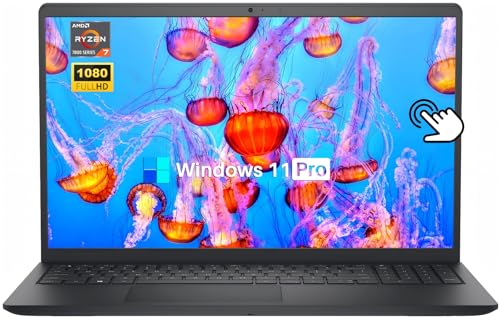
Dell Inspiron 15 3535 Touchscreen
- Best for: A student with demanding projects, shared presentations, and a heavy multitasking workload.
- Display: 15.6-inch FHD touchscreen display
- Processor: AMD Ryzen 7 7730U, 8-core processor
- Graphics: AMD Radeon Graphics
- Memory: 16GB 3200MHz RAM
A student with demanding projects, shared presentations, and a heavy multitasking workload.
Check the rental return terms for the touchscreen, since a cracked or scratched display can attract a damage charge.
The Dell Inspiron 15 3535 Touchscreen is the strongest performer in this set, and it suits students with demanding group projects, data work, or creative coursework. Its AMD Ryzen 7 7730U processor has eight cores, and with 16GB of 3200MHz RAM and a 512GB solid-state drive it handles large documents, many browser tabs, and heavier applications together. The 15.6-inch Full HD touchscreen display makes it easy to present work to classmates and navigate files directly on screen. Windows 11 Pro adds features that suit shared and managed study environments, and the numeric keypad helps with spreadsheets and coursework that involves figures.
Which One Fits Your Situation
Renting for one semester with light coursework
Choose the Lenovo IdeaPad 1 Student Laptop. Its Full HD display, 8GB of RAM, and straightforward Windows 11 setup cover essays, readings, and video calls without extra features a short rental does not need. The numeric keypad helps with any coursework involving numbers, and the simple specification keeps the machine easy to set up and easy to hand back at the end of term.
Juggling many subjects and dozens of open tabs
Choose the HP 15 Laptop PC 15-fd0099nr. The Core i7 processor and 16GB of memory keep research, writing, and video calls running together, while the 512GB drive holds a full year of files. Its sharp Full HD display and manageable weight make it a dependable daily companion for a student with a crowded timetable and a long reading list.
Taking notes by hand on screen and presenting often
Choose the Acer Aspire 3 A315-24PT-R0UX. The Full HD IPS touchscreen makes annotation and navigation direct, and the Ryzen 5 processor with 16GB of memory keeps study sessions smooth. Wi-Fi 6 and a slim design suit busy campus days, and the generous storage leaves room for slides, recordings, and project files.
Carrying a laptop everywhere and sharing a flat
Choose the ASUS Vivobook Go 15 E1504FA-AB34 for daily carrying: it is slim and durable, with a privacy shutter for shared rooms. When the work itself is heavier, pick the Dell Inspiron 15 3535 Touchscreen instead, with eight-core power and Windows 11 Pro for demanding group projects. Both return well when kept in a sleeve and charged with the supplied adapter.
Common Mistakes
- Choosing the cheapest rental without checking memory and storage, then running out of room midway through the term.
- Ignoring the keyboard and screen, and discovering too late that long essays and late-night reading are uncomfortable.
- Assuming every laptop has the same ports, and finding no HDMI or USB-C connection for a classroom display or second monitor.
- Forgetting to check the rental return terms, including what counts as wear and what counts as damage.
- Skipping a backup plan for coursework, so a single fault or a lost charger puts assignments at risk.
Frequently Asked Questions
How much memory does a student rental laptop need?
Eight gigabytes of RAM is enough for writing, browsing, and video calls during a light rental term. Sixteen gigabytes is safer for a full academic year, for students who keep many tabs open, or for anyone running heavier software alongside a browser. Memory is hard to change on many slim laptops, so choose for the busiest week of the term.
Is a touchscreen worth it on a rental laptop?
A touchscreen is worth it when a student annotates readings, scrolls through long documents, or presents work to a group, because direct interaction feels faster than a trackpad alone. It matters less for students who mainly type essays and browse the web. If the rental is shared or carried daily, check the return terms for the display and use a sleeve.
What should I check on the day a rental laptop arrives?
Check that the laptop starts cleanly, connects to Wi-Fi, and recognises its charger, then open the applications needed for classes and confirm the webcam and speakers work. Note any marks or scratches and report them to the rental provider straight away. Finally, confirm the return date and what must be included in the box.
Can one laptop cover both study and everyday entertainment?
Yes, when the specification matches both uses. A Full HD display, 8GB or more of RAM, and a solid-state drive cover lectures, writing, and streaming without difficulty, and a stronger processor helps with editing. Keep coursework and media in separate folders, back up important files, and return the rental in good condition.