Key takeaways
- Keep your desk keyboard dust-free with the best keyboard cleaning kits for home office use. Compare pullers, brushes, air dusters and gel picks.
A home office keyboard collects dust, crumbs, pet hair and skin oils every day, and the grime hides exactly where it is hardest to reach: between the keys, under the keycaps and along the edges of the case. A damp cloth can wipe the tops of the keys, but it cannot lift debris out of the gaps, and poking around with a toothpick risks scratching the legends. A dedicated keyboard cleaning kit solves this with tools shaped for the job, from wire keycap pullers and soft brushes to compressed air and reusable cleaning gel.
The right kit depends on the keyboard you own and how deep you want to clean. Laptop owners need gentle tools that work around fixed keys, while mechanical keyboard owners benefit from pullers that lift keycaps and switches for a full strip-down. This guide compares five keyboard cleaning kits that cover both styles, so you can match the tools to your desk setup instead of buying gadgets you will never use.
As an Amazon Associate, we earn from qualifying purchases.
Quick answer
The Ordilend 10-in-1 kit is the best all-round pick for most home offices, with a keycap puller, brushes and cloths in one compact case. The Tassmpitor kit is a close second for laptop users. ColorCoral gel suits quick crumb removal, Falcon Dust-Off blasts out loose dust, and the Atdcoek puller set is the pick for mechanical keyboard deep cleans.
1. Ordilend 10-in-1 Keyboard Cleaner and Laptop Cleaning Kit

The Ordilend 10-in-1 kit is the most complete single purchase in this guide, covering surface cleaning and deep cleaning in one portable case. It includes a retractable large brush, a soft thin brush for working between keys, a metal pen tip for narrow gaps, a keycap puller for mechanical boards, and polishing cloths for screens and smooth surfaces, plus a small refillable spray bottle for dampening the cloth. The brush retracts into its own housing and the set is small enough for a desk drawer or a laptop bag. The large brush suits mechanical, gaming and laptop keyboards. The small spray bottle is only a cloth-dampening aid, and the kit has no compressed air.
Specs
| Feature | Detail |
|---|---|
| Kit pieces | 10 |
| Keycap puller | Included |
| Brushes | Retractable large brush and soft thin brush |
| Cloth | Polishing microfiber cloths |
| Spray bottle | Refillable, small capacity |
| Best for | All-round home office keyboard cleaning |
| Compatibility | Mechanical, gaming and laptop keyboards |
2. Tassmpitor Laptop Cleaning Kit

The Tassmpitor kit is the best choice for laptop-first home offices, because its tools are tuned for the flatter, tighter key spacing of a notebook keyboard. The retractable brush sweeps crumbs off the key tops without snagging, while the mini high-density brush reaches between the low-profile keys where dust collects. A keycap puller is included for removable caps, and the metal pen tip helps lift debris from the gaps around the keys. Two polishing cloths and replacements cover the keyboard and screen in one pass. The kit measures 4.72 by 2.24 by 1.46 inches and weighs 5.3 ounces, so it travels easily in a bag. The spray bottle is small, at 2 milliliters, so it is meant for dampening a cloth rather than for heavy cleaning.
Specs
| Feature | Detail |
|---|---|
| Kit pieces | 10 |
| Keycap puller | Included |
| Brushes | Retractable large brush and mini high-density brush |
| Cloth | Polishing cloths plus replacement cloths |
| Spray bottle | Refillable, 2 milliliters |
| Dimensions | 4.72 by 2.24 by 1.46 inches |
| Weight | 5.3 ounces |
| Best for | Laptop keyboards and travel use |
3. ColorCoral Cleaning Gel Universal Dust Cleaner, 160g
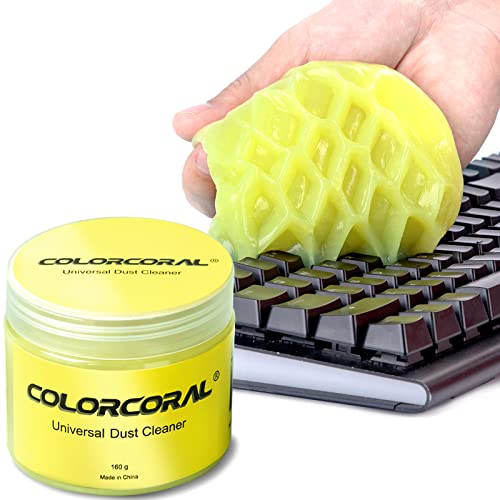
ColorCoral cleaning gel takes a completely different approach from the brush and puller kits: it is a soft, reusable gel that you press into the gaps between keys, where it picks up dust and crumbs on contact. The gel is not sticky to hands and carries a lemon fragrance. The single can holds 160 grams of gel, and the listing says it can be reused again and again until the color turns dark, at which point it should be replaced. It should not be washed with water. There is nothing to assemble and no technique to learn: knead a piece into a ball, press it slowly into the keyboard surface, and pull it out with the dust attached. Gel is a surface tool, not a deep-cleaning tool: it cannot remove keycaps or reach under a switch, and it leaves residue behind if pressed too hard into a warm keyboard.
Specs
| Feature | Detail |
|---|---|
| Product type | Reusable cleaning gel |
| Gel weight | 160 grams |
| Scent | Lemon |
| Reusable | Yes, until the color turns dark |
| Keycap puller | Not included |
| Best for | Quick crumb and dust removal |
| Surfaces | Keyboards, vents, printers, telephones |
| Power source | None |
4. Falcon Dust-Off Disposable Compressed Gas Duster, 10 oz

Falcon Dust-Off is the classic compressed gas duster, and it remains the fastest way to clear loose dust and crumbs from a keyboard without touching the keys at all. Each can holds 10 fluid ounces of compressed gas, and the included extension straw directs the blast into the narrow gaps between keys, around the edges of the case and into vents. The gas is ozone-safe and moisture-free, and the can is disposable once empty. A few short bursts lift loose debris out of the gaps, and then a brush or cloth can deal with anything that remains. Because there is no contact with the keyboard surface, there is no risk of scratching legends or pushing debris deeper. The limits are real, though: a can is a consumable, so heavy users will need replacements, and it does nothing for sticky grime, fingerprints or debris trapped under keycaps.
Specs
| Feature | Detail |
|---|---|
| Product type | Disposable compressed gas duster |
| Can size | 10 fluid ounces |
| Gas type | Compressed gas, ozone-safe and moisture-free |
| Extension straw | Included |
| Keycap puller | Not included |
| Best for | Blowing loose dust and crumbs from gaps |
| Contact cleaning | No, touch-free air blast |
| Reusable | No, disposable can |
| Surfaces | Keyboards, computer cases, fans, printers |
5. Atdcoek 2-in-1 Mechanical Keyboard Keycap Puller and Switch Puller Tool Kit

The Atdcoek kit is the specialist pick in this guide, built for mechanical keyboard owners who want to take their board apart for a proper deep clean. The set includes two keycap pullers, a switch puller, a keyboard brush and four wipes, all built around stainless steel tools. The pullers are designed for Cherry MX, Alps and Topre switches, which covers most mechanical boards found on a home office desk. The wire keycap puller lifts caps without scratching the legends, and the switch puller removes switches from hot-swap boards so the plate can be cleaned. Dust and hair collect under keycaps over months of use, and the only way to remove that buildup is to take the caps off and clean the plate directly. The limitation is scope: this is a puller and brush set, not a general cleaning kit, so it has no cloths for screens, no spray and no air duster. Laptop owners should skip it entirely, since laptop keys are not designed to be pulled.
Specs
| Feature | Detail |
|---|---|
| Kit pieces | 2 keycap pullers, 1 switch puller, 1 brush, 4 wipes |
| Handle material | Stainless steel |
| Keycap puller | Included, wire style |
| Switch puller | Included |
| Compatibility | Cherry MX, Alps and Topre switches |
| Brush | Keyboard brush included |
| Wipes | 4 included |
| Best for | Mechanical keyboard deep cleaning |
How to choose
Laptop owners should pick a kit with a retractable brush, a thin brush for low-profile keys and a cloth, which points to the Tassmpitor or Ordilend sets. Mechanical keyboard owners should make sure the kit includes a wire keycap puller, and hot-swap board owners should add a switch puller like the Atdcoek set.
Next, think about how you clean. If you like a quick routine, a duster and a gel cover most of the work in minutes. If you prefer a thorough monthly clean, a puller kit with brushes is the better investment. Check what is actually in the box before buying: a keycap puller, at least one brush and a cloth cover the essentials, while a spray bottle, pen tip and sponge are useful extras.
Who should skip
Skip a full cleaning kit if your keyboard is already cleaned regularly with a cloth and a duster and you have no debris problems. A simple microfiber cloth and a can of compressed air may be all you need, and a puller set would sit unused. Laptop owners should skip any kit centered on keycap and switch pullers, since removing laptop keys risks breaking the scissor mechanism underneath. People with sealed or membrane keyboards that cannot be opened should also skip deep-cleaning tools and stick to surface cleaning. Anyone sensitive to fragrances should skip scented cleaning gel, and anyone who dislikes disposable products should avoid canned air in favor of a reusable brush kit.
FAQ
How often should I clean my home office keyboard?
A light clean once a week keeps dust and crumbs under control with a brush or duster. A deeper clean, including removing keycaps on a mechanical board, makes sense every one to three months.
Can I use a keycap puller on a laptop keyboard?
No, laptop keys are held by small scissor mechanisms that break easily, and most laptop keycaps are not designed to be removed. Use a soft brush, a duster and a cloth on a laptop keyboard, and leave pullers for mechanical boards.
Is cleaning gel safe for mechanical keyboards?
Cleaning gel is safe for pressing into the gaps between keys on a mechanical board. Do not press it hard into a warm keyboard, do not leave it sitting on the keys, and never wash it with water. Replace it when it turns dark or becomes sticky.
Do I need compressed air if I already have a brush kit?
Compressed air is not essential, but it speeds up the job. A duster blasts loose debris out of the gaps before you brush, so there is less sweeping and less chance of pushing crumbs deeper.
Final verdict
The Ordilend 10-in-1 kit is the best keyboard cleaning kit for most home offices, because it bundles a keycap puller, two brushes, a pen tip and cloths in a compact case that covers both surface cleaning and deeper work. Laptop users should pick the Tassmpitor kit instead, while ColorCoral gel is the fastest option for a quick crumb clean and Falcon Dust-Off is the best first step for blowing out loose dust. Mechanical keyboard owners who want a true deep clean should add the Atdcoek puller set, which is the only kit here that removes switches as well as keycaps.