Key takeaways
- Compare the best WiFi extenders for a home office, from WiFi 6 mesh extenders to simple wall-plug boosters that fix dead zones and dropped video calls.
A home office at the far end of the house from the router is a recipe for frozen video calls and uploads that crawl. Walls, floors, and appliances all weaken a WiFi signal, and the corner desk that makes a quiet workspace is often the worst spot in the home for reception. A WiFi extender rebroadcasts the existing network into that dead zone, restoring the speed the rest of the house already enjoys.
This guide covers five extenders that suit home office use, from a WiFi 6 mesh extender that keeps a single network name to compact wall-plug models that fix one room. The buying advice below explains the differences between mesh and classic repeating, how much coverage the ratings really promise, and where to place an extender so it helps instead of halving the speed.
As an Amazon Associate, we earn from qualifying purchases.
Quick Answer
For most home offices, the TP-Link RE600X is the best pick because its WiFi 6 radios, gigabit Ethernet port, and access point mode cover a dead-zone desk and a wired printer at the same time. Choose the NETGEAR EAX15 for seamless mesh roaming under one network name, or the NETGEAR EX6120 for a simple, affordable single-room fix.
How to Choose
Decide first between a mesh extender and a classic repeater. A mesh extender joins the router’s network and keeps the same network name, so a laptop moving between rooms hands off without a manual switch. A classic extender often creates a second network name with an EXT suffix, which works fine for a fixed desk but can strand a phone on the weaker network. For a stationary office, either design works; for a home where devices roam, mesh is worth it.
Match the speed class to the internet plan and the router. An AC1200 extender delivers up to 1.2Gbps of combined dual-band throughput, plenty for video calls and cloud work on a mid-tier plan. A WiFi 6 AX1800 extender raises that to 1.8Gbps and handles busy households better, but only WiFi 6 devices gain the full benefit. Buying a faster extender than the router and plan can feed brings little gain, so pair like with like.
Coverage ratings are optimistic laboratory numbers. A rating of 1,500 square feet assumes open space, and real homes with brick, plaster, or concrete walls will see less. What matters more is placement: an extender needs a strong signal where it sits, ideally halfway between the router and the office, in line of sight of both where possible. Placed inside the dead zone itself, it has nothing worth repeating.
Finally, check the Ethernet port. A wired port lets a desktop, printer, or docking station plug in directly, which is faster and more stable than any wireless hop, and access point mode lets the extender become a wired access point if an Ethernet run is available later.
TP-Link RE600X AX1800 WiFi 6 Range Extender

The RE600X is the most complete extender here for a working office. Its WiFi 6 radios deliver AX1800 speeds across both bands, TP-Link rates coverage up to 1,500 square feet and 30 devices, and the gigabit Ethernet port can wire a desktop or printer that sits beside the desk. It also supports access point mode, so if an Ethernet cable ever reaches the office, the same unit becomes a proper wired access point.
It works with OneMesh when paired with a compatible TP-Link router, extending the network under one name, and the Tether app walks through placement with a signal strength readout. For an office that mixes video calls, large file transfers, and several connected devices, this is the extender with the fewest compromises.
Specs
| Spec | Detail |
|---|---|
| WiFi standard | WiFi 6, AX1800 dual band |
| Rated coverage | Up to 1,500 sq ft, 30 devices |
| Ethernet port | 1 gigabit port |
| Access point mode | Yes |
| Mesh support | OneMesh with TP-Link routers |
| Security | WPA3 supported |
NETGEAR EAX15 AX1800 WiFi 6 Mesh Extender

The EAX15 is built for homes that want the dead zone gone without a second network name to manage. As a mesh extender, it broadcasts the same name and password as the existing router and supports smart roaming, so calls stay connected when moving between the office and the rest of the house. NETGEAR rates it for up to 1,500 square feet of added coverage and up to 20 devices.
It works with any standard router, supports WPA3 security, and uses WiFi 6 features such as OFDMA to handle many simultaneous devices more gracefully than older extenders. There is no Ethernet port for wiring a desktop, which is the one office compromise. For a laptop-based office on a busy family network, the seamless single-name experience is the better trade.
Specs
| Spec | Detail |
|---|---|
| WiFi standard | WiFi 6, AX1800 dual band |
| Rated coverage | Up to 1,500 sq ft, 20 devices |
| Ethernet port | None |
| Access point mode | No |
| Mesh support | Yes, single network name |
| Security | WPA3 supported |
TP-Link RE315 AC1200 Mesh WiFi Extender
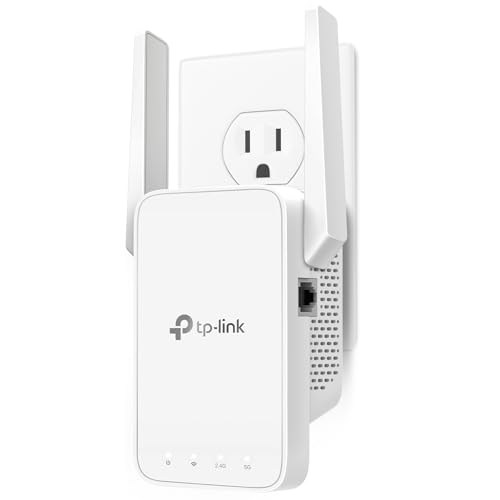
The RE315 covers the mainstream case well: a dual-band AC1200 extender rated for up to 1,500 square feet and 30 devices, with support for both OneMesh and EasyMesh routers so it can join a mesh network under one name. An Ethernet port on the side wires a printer, desktop, or smart TV that lives in the office.
Setup runs through the Tether app or a WPS button press, and the app shows signal quality to help find a good outlet. It lacks WiFi 6, so a household already on WiFi 6 devices will not get the newest efficiency gains, but for extending a typical dual-band router into one office room, the RE315 delivers the essentials at a sensible step below the RE600X.
Specs
| Spec | Detail |
|---|---|
| WiFi standard | WiFi 5, AC1200 dual band |
| Rated coverage | Up to 1,500 sq ft, 30 devices |
| Ethernet port | 1 fast Ethernet port |
| Access point mode | Yes |
| Mesh support | OneMesh and EasyMesh |
| Security | WPA2 and WPA3 |
NETGEAR EX6120 AC1200 WiFi Range Extender
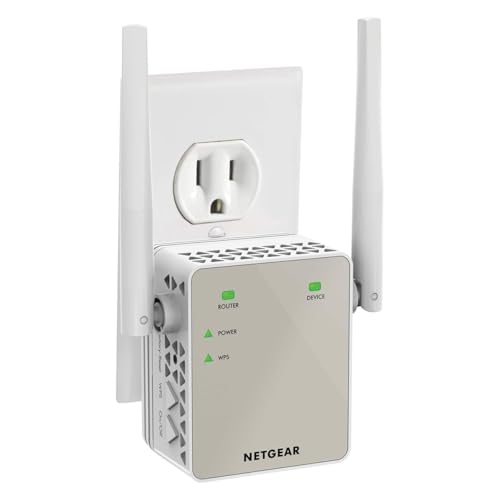
The EX6120 is the simple wall-plug fix for one weak room. It plugs directly into an outlet with no cord or shelf needed, adds up to 1,500 square feet of rated coverage for up to 25 devices, and includes an Ethernet port for wiring a single desktop or printer. NETGEAR’s FastLane feature can dedicate one band to the router link for a faster backhaul.
As a classic extender it may broadcast a separate network name depending on configuration, which suits a fixed desk that never moves. External antennas help pull in the router signal from a hallway outlet. For an office that just needs calls to stop dropping and has no plans for mesh roaming, the EX6120 is the straightforward, proven choice.
Specs
| Spec | Detail |
|---|---|
| WiFi standard | WiFi 5, AC1200 dual band |
| Rated coverage | Up to 1,500 sq ft, 25 devices |
| Ethernet port | 1 fast Ethernet port |
| Access point mode | Yes |
| Mesh support | No, classic extender |
| Design | Wall-plug with external antennas |
NETGEAR EX6150 AC1200 WiFi Mesh Extender

The EX6150 sits between the classic and modern designs: a compact wall-plug unit that adds mesh-style smart roaming, keeping one network name while devices move. NETGEAR rates it for up to 1,200 square feet of added coverage and up to 20 devices, which fits a single office or a small apartment rather than a whole floor.
An Ethernet port allows a wired connection for a desktop, and the plug-through design keeps the unit tidy in a hallway or office outlet. Its WiFi 5 radios are a step behind the WiFi 6 picks, so it suits households whose router is also WiFi 5. For a smaller home office that wants seamless roaming without replacing anything else, the EX6150 fills the gap neatly.
Specs
| Spec | Detail |
|---|---|
| WiFi standard | WiFi 5, AC1200 dual band |
| Rated coverage | Up to 1,200 sq ft, 20 devices |
| Ethernet port | 1 fast Ethernet port |
| Access point mode | Yes |
| Mesh support | Yes, smart roaming |
| Design | Compact wall-plug |
Who Should Skip It
Skip an extender if the office is close enough to the router for an Ethernet cable, because a wired connection beats every wireless hop for calls and transfers. Skip one if the underlying internet plan or router is the real bottleneck, since an extender only repeats what it receives and cannot create speed the router never had. Homes with thick masonry walls or several dead rooms are usually better served by a full mesh router system with multiple nodes than by stacking extenders. And if the problem is interference from neighboring networks in a dense apartment building, repositioning the router or switching channels may fix more than an extender would.
FAQ
Does a WiFi extender slow down the connection?
A classic single-radio extender can cut throughput on the extended network because it receives and rebroadcasts on the same channel. Dual-band models reduce the penalty by dedicating one band to the router link. Devices wired into the extender’s Ethernet port avoid most of the loss, which is why a port matters for a desk setup.
Where should an extender be placed?
Halfway between the router and the office, in a spot that still shows a strong signal from the router. Too close to the router adds little coverage; too far into the dead zone leaves it repeating a weak signal. Most setup apps show a signal indicator or placement warning to confirm the outlet is in the useful range.
Will an extender work with any router brand?
Yes, extenders are brand-agnostic and work with standard routers from any maker. Brand-specific mesh features such as OneMesh only activate with a compatible router from the same brand, but the basic extending function works regardless. WPA3 support on both devices is needed to use that security level.
How is an extender different from a mesh WiFi system?
An extender adds one rebroadcast point to an existing router and is the cheaper fix for a single dead room. A mesh system replaces the router with several coordinated nodes designed together, giving more even coverage across a large home. For one office at the end of a hallway, an extender is usually enough.
Final Verdict
Most home offices should choose the TP-Link RE600X for its WiFi 6 speed, gigabit port, and access point flexibility. Pick the NETGEAR EAX15 when seamless roaming under one network name matters most, the RE315 for solid mesh-capable coverage on a WiFi 5 router, and the EX6120 or EX6150 for simple single-room fixes in wall-plug form. Match the extender class to the router, place it halfway, and the office dead zone becomes a non-issue.