Key takeaways
- Compare the best smart plugs for a home office, from Matter and HomeKit picks to simple Alexa plugs with scheduling and energy monitoring for desk gear.
A home office runs on equipment that rarely needs to stay powered around the clock. Monitors, printers, desk lamps, speakers, and chargers all sip standby power overnight and on weekends, and reaching behind a desk to switch each one off is a chore nobody keeps up. A smart plug solves the problem by putting every outlet on a schedule, a voice command, or a phone app.
This guide covers five smart plugs that suit desk and home office use, from a Matter-ready four-pack with energy monitoring to a simple single plug for Alexa households. The buying advice below explains which features actually matter at a desk, including voice assistant compatibility, load ratings, and whether energy monitoring is worth having.
As an Amazon Associate, we earn from qualifying purchases.
Quick Answer
For most home offices, the Kasa Smart Plug HS103P4 four-pack is the best starting point because it works with Alexa, Google Assistant, and IFTTT, needs no hub, and covers several devices at once. Choose the Kasa EP25P4 for energy monitoring and Apple HomeKit support, or the Amazon Smart Plug for the simplest Alexa-only setup.
How to Choose
Start with the voice assistant and smart home platform already in use. A plug that speaks to Alexa will not respond to Siri unless it also supports Apple HomeKit, and Google Assistant households need their own compatibility. Matter is the newest cross-platform standard, and a Matter plug can join Apple Home, Alexa, Google Home, and SmartThings at the same time, which makes it the safest choice for mixed households or anyone likely to switch platforms later.
Check the load rating before plugging in anything with a motor or heating element. Most smart plugs here are rated for 15 amps of resistive load, which comfortably covers monitors, lamps, printers, and chargers. Space heaters, kettles, and large laser printers on a heavy print cycle can push closer to that ceiling, so match the plug rating to the device label and never exceed it.
Energy monitoring separates the useful desk plugs from the basic ones. A monitoring plug reports how much power a device draws, which exposes the standby drain of an old monitor or a printer that never truly sleeps. That data turns scheduling from guesswork into a decision, because the biggest drains can be cut off overnight while low-draw devices stay live.
Finally, look at the physical design. Compact plugs that leave the second outlet free are worth having behind a desk where sockets are scarce. All five picks below connect directly to 2.4GHz WiFi with no separate hub, and all support schedules and timers through their apps, so the differences come down to platform support, monitoring, and pack size.
Kasa Smart Plug HS103P4 (4-Pack)

The HS103P4 is the dependable default for a home office that runs on Alexa or Google Assistant. Each plug handles up to 15 amps, carries UL certification, and connects straight to 2.4GHz WiFi with no hub to buy or configure. The Kasa app supports schedules, countdown timers, and an away mode that varies on and off times, which suits lamps and visible desk gear during travel weeks.
A four-pack matters at a desk because standby loads cluster together: two monitors, a printer, and a powered speaker can each take a plug, and grouping them in the app lets one routine shut the whole workstation down at night. Voice control through Alexa, Google Assistant, and IFTTT covers most households, though Apple HomeKit users should look at the EP25P4 below instead. For a straightforward, proven plug in useful quantities, this is the pack to start with.
Specs
| Spec | Detail |
|---|---|
| Pack size | 4 plugs |
| Load rating | 15A maximum, UL certified |
| Voice control | Alexa, Google Assistant, IFTTT |
| WiFi band | 2.4GHz only |
| Hub required | No |
| Energy monitoring | No |
Kasa Smart Plug Mini EP25P4 (4-Pack)

The EP25P4 adds the two things the HS103 line lacks: energy monitoring and Apple HomeKit support. It works with Siri, Alexa, and Google Assistant, so a mixed household can control the same plugs from iPhones and Android phones alike. The monitoring reports real-time consumption in the Kasa app, which makes it easy to spot a monitor or charger that draws more than expected while idle.
The mini housing is compact enough to leave the neighboring outlet usable, an everyday advantage behind a crowded desk. The rating stays at 15 amps, and setup happens over 2.4GHz WiFi without a hub. For anyone building a desk shutdown routine around actual power data rather than guesses, or anyone committed to HomeKit, this four-pack is the strongest all-around pick in the guide.
Specs
| Spec | Detail |
|---|---|
| Pack size | 4 plugs |
| Load rating | 15A maximum |
| Voice control | Siri, Alexa, Google Assistant |
| WiFi band | 2.4GHz only |
| Hub required | No |
| Energy monitoring | Yes |
Kasa Matter Smart Plug KP125M (4-Pack)

The KP125M is the future-proof option, built on the Matter standard so it can join Apple Home, Alexa, Google Home, and SmartThings without being tied to one brand’s ecosystem. It pairs that flexibility with energy monitoring and a 15 amp, 1800 watt rating, which covers the full range of normal desk equipment.
Matter devices communicate locally on the home network, so basic on and off commands keep working quickly even when a cloud service is slow. Setup uses a code scan in whichever platform app the household prefers. For a home office that might change phones, speakers, or platforms over the next few years, this is the plug least likely to need replacing, and the monitoring data still helps trim standby waste in the meantime.
Specs
| Spec | Detail |
|---|---|
| Pack size | 4 plugs |
| Load rating | 15A, 1800W maximum |
| Voice control | Apple Home, Alexa, Google Home, SmartThings |
| Protocol | Matter over WiFi |
| Hub required | No |
| Energy monitoring | Yes |
Amazon Smart Plug
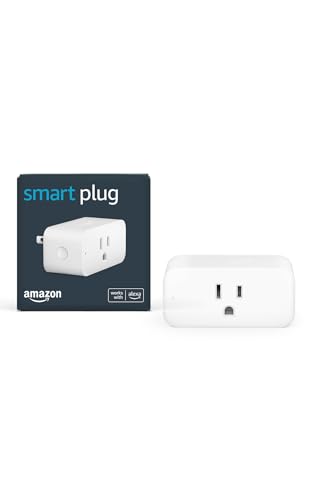
The Amazon Smart Plug keeps things deliberately simple for Alexa households. There is no separate app to learn: setup and control happen inside the Alexa app, and the plug responds to Echo speakers and Alexa routines like any other smart home device. A compact body leaves the second wall outlet free, which helps in the tight spaces behind desks and filing cabinets.
The trade-offs are clear. There is no energy monitoring, no Google Assistant or HomeKit support, and it works only on 2.4GHz WiFi. Within an Alexa-centered home office, though, it is the lowest-friction way to put a lamp, a fan, or a monitor on a spoken command or a weekday schedule, and routines can tie it to motion sensors or door locks already in the Alexa app.
Specs
| Spec | Detail |
|---|---|
| Pack size | 1 plug |
| Load rating | 15A maximum |
| Voice control | Alexa only |
| WiFi band | 2.4GHz only |
| Hub required | No |
| Energy monitoring | No |
Wyze Plug (2-Pack)

The Wyze Plug is the budget-friendly way to add scheduling to a couple of devices without committing to a four-pack. Sold as a pair, the plugs support Alexa, Google Assistant, and IFTTT, and the Wyze app includes a vacation mode that randomizes on and off times for lamps while the house is empty. Each plug is rated for 15 amps and connects over 2.4GHz WiFi with no hub.
There is no energy monitoring, and the app experience is more basic than Kasa’s, but for common desk jobs — a lamp that follows office hours, a fan on a timer, a printer that only wakes on weekdays — the feature set is complete. Buyers who later want consumption data can add a monitoring plug for the hungriest device and keep these on simple schedules.
Specs
| Spec | Detail |
|---|---|
| Pack size | 2 plugs |
| Load rating | 15A maximum |
| Voice control | Alexa, Google Assistant, IFTTT |
| WiFi band | 2.4GHz only |
| Hub required | No |
| Energy monitoring | No |
Who Should Skip It
Skip smart plugs entirely for anything that must never lose power: a desktop computer in the middle of work, a network drive, a router, or medical equipment. Sudden power cuts are exactly what these plugs do on a schedule, so keep always-on infrastructure on plain outlets. Also skip them for space heaters and other high-draw heating appliances unless the plug rating clearly exceeds the appliance draw, and skip WiFi plugs altogether if the office network is unreliable, since a dropped connection can leave a schedule half-executed. Finally, anyone who only needs a single lamp on a timer may be happier with a mechanical timer outlet, which needs no app, no account, and no network at all.
FAQ
Do smart plugs use much power themselves?
Very little. A connected plug draws a small amount of standby power to keep its WiFi radio alive, typically far less than the monitor, printer, or charger it switches off overnight. The net effect in a home office is almost always a saving, especially when the plug controls several always-on desk devices at once.
Will a smart plug work if the internet goes down?
Basic on and off control from the app on the home network usually keeps working, and schedules stored on the device continue to run. Voice control through a cloud assistant and remote access from outside the home stop working until the connection returns. Matter plugs keep local control through their platform hub during an outage.
Can a smart plug handle a laser printer or space heater?
Only within its rating. These plugs are rated at 15 amps for resistive loads, and a laser printer’s fuser or a heater can draw close to that on its own. Check the appliance label, leave headroom, and never run a heater on a plug that also feeds other equipment. When in doubt, keep heating appliances on a standard wall outlet.
Do I need a hub for any of these plugs?
No. All five picks connect directly to 2.4GHz WiFi and are managed from their apps or platform apps. A smart home hub or speaker is only needed for voice control, not for schedules, timers, or app control from a phone.
Final Verdict
Most home offices should start with the Kasa HS103P4 four-pack for its broad voice support and useful quantity, then add monitoring where it counts: the EP25P4 for HomeKit households and consumption data, or the KP125M for a Matter setup that will outlast any single platform. The Amazon Smart Plug suits Alexa-only homes that value simplicity, and the Wyze two-pack covers a lamp and a fan on a small budget. Pick by platform first, monitoring second, and the desk will shut itself down on schedule every night.