Key takeaways
- Compare under-desk CPU holders with desk and floor CPU stands to find the right fit for your tower, desk, airflow, cable access, and daily use.
A desktop tower takes up real space, collects dust on the floor, and puts its ports in awkward places. An under-desk CPU holder and a desk or floor CPU stand both solve that problem in different ways: one suspends the tower beneath the work surface, while the other lifts it off the floor or keeps it beside the desk on wheels.
The right choice depends less on the holder itself and more on the tower, the desk, and how often the case needs to move. A light mini tower on a solid desktop is a different job from a heavy gaming tower on a thin standing desk. Measure the case first, then match the mount or stand to those measurements.
As an Amazon Associate, we earn from qualifying purchases.
Quick Answer
Under-desk holders suit light to mid-weight towers on solid desks where floor space matters and the case can stay put. Desk and floor CPU stands suit heavier or wider towers, rented desks, thin desktops, and setups where the tower moves often for cleaning or cable changes. Check case width, height, weight, and vents before choosing either side.
Under-Desk Holders vs Desk and Floor Stands at a Glance
An under-desk holder screws or clamps to the underside of the desk and holds the tower in the air. The floor stays clear and the case stays off carpet. The trade is permanence: installation takes tools, the desk must be strong enough for the combined weight, and the tower hangs in a fixed place unless the holder swivels.
A desk or floor stand takes the opposite approach. The tower sits on a low platform, often on caster wheels, beside or under the desk. Nothing is screwed into the desk, and the case rolls out for cleaning or a cable swap. The trade is floor space. A suspended holder leaves the bottom open, while a floor stand lifts the case off carpet. In both cases, vents must stay clear.
| Feature | Under-Desk Holders | Desk and Floor CPU Stands |
|---|---|---|
| Installation | Screws or clamps under the desk | No desk fixing, place and roll |
| Floor space | Frees the floor completely | Uses a small floor footprint |
| Best tower weight | Light to mid-weight towers | Mid-weight to heavy towers |
| Moving the case | Limited, unless the holder swivels | Easy, on caster wheels |
| Desk requirement | Solid desktop of stated thickness | Works with almost any desk |
1. Vivo Under-Desk and Wall PC Mount

The Vivo mount is the straightforward under-desk option here: a steel holder that mounts under a desk or on a wall, with an adjustable frame for most standard towers. Its stated capacity is 22 lbs, so it belongs with light office towers and compact mid-tower cases. The frame adjusts from 3.5 to 7.8 inches wide and fits cases 11.5 to 20.5 inches tall.
Swivel sets this holder apart from a fixed cradle: the mount turns through 135 degrees, so the rear ports are reachable without removing the case. Protective padding lines the contact points, and the desktop should be at least 1 inch thick.
Specs
| Specification | Detail |
|---|---|
| Mount type | Under-desk or wall mount |
| Weight capacity | 22 lbs |
| Case width range | 3.5 to 7.8 inches |
| Case height range | 11.5 to 20.5 inches |
| Swivel | 135 degrees |
| Material | Steel |
| Minimum desktop thickness | 1 inch |
| ASIN | B01MEDE9WO |
2. Putorsen Under-Desk PC Mount
The Putorsen mount is the heavy-duty answer on the under-desk side, with a stated capacity of up to 77 lbs. The width adjusts from 7.9 to 13.4 inches, much wider than the standard holder, and the listing describes it for mid-tower and mini-tower cases. Protective mats guard the case finish where the frame grips it.
A heavier tower with a large cooler, a full-size graphics card, and several drives can exceed a light mount by a wide margin. This mount still needs a desk that can carry the load, and a solid wood or thick laminate top suits it better than a thin hollow-core top.
Specs
| Specification | Detail |
|---|---|
| Mount type | Under-desk mount |
| Weight capacity | Up to 77 lbs |
| Case width range | 7.9 to 13.4 inches |
| Protective mats | Included |
| ASIN |
3. Waoceo Universal PC Case Holder

The Waoceo holder is a universal under-desk and wall-side mount. Its height adjusts from 50 to 530 mm, its width from 135 to 235 mm, and the maker states a maximum loading of 30 kg. The frame is SPCC cold rolling steel, and it suits most PC host cases with a height below 530 mm and a thickness from 135 to 235 mm.
Convert that millimetre sizing before ordering. The 135 to 235 mm width covers slim and standard towers, while the 530 mm height limit covers most mid-tower cases. The 30 kg loading sits between the light Vivo mount and the heavy Putorsen mount, making this a middle-ground choice. The same frame can hang under the desk or fix to a wall beside it.
Specs
| Specification | Detail |
|---|---|
| Mount type | Under-desk hanger or wall-side mount |
| Maximum loading | 30 kg |
| Height adjustment | 50 to 530 mm |
| Width adjustment | 135 to 235 mm |
| Material | SPCC cold rolling steel |
| Case fit | Height below 530 mm, thickness 135 to 235 mm |
| ASIN | B0CRKW2JDM |
4. Hovadova Adjustable Mobile CPU Stand

The Hovadova stand represents the floor side: a ventilated mobile CPU stand with four caster wheels and an adjustable width for most PC towers. Its stated load capacity is 88 pounds, and its dimensions are 15.7 by 11.8 by 2.8 inches. The frame is polycarbonate, and the open design leaves airflow clear beneath the case.
No drilling, no clamps, and no desk-strength question are involved. The tower lifts off the carpet, rolls out for cleaning or a cable change, and rolls back under the desk when done. That mobility is the real advantage over a fixed holder. The 88 pound capacity also covers heavier towers. The trade is that the tower still needs floor space, and the stand is only 2.8 inches tall.
Specs
| Specification | Detail |
|---|---|
| Stand type | Floor stand with caster wheels |
| Weight capacity | 88 pounds |
| Product dimensions | 15.7 by 11.8 by 2.8 inches |
| Wheels | 4 caster wheels |
| Material | Polycarbonate |
| ASIN | B0C4T42TPC |
5. Bytesium PC Tower Stand
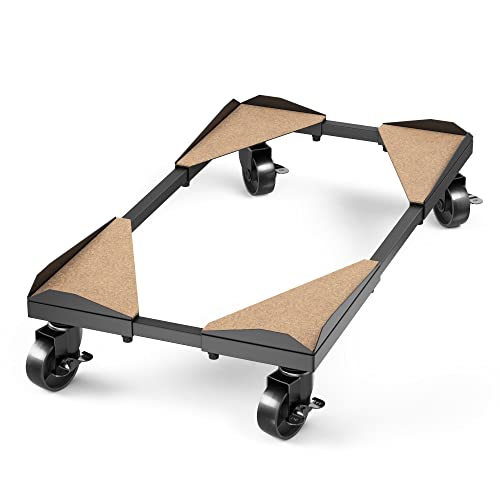
The Bytesium stand is the premium floor option here, built as a fully adjustable metal frame rather than a fixed plastic platform. Its width adjusts from 7.87 to 14.17 inches and its length from 14.17 to 25.39 inches, with a clearance of 3.42 inches above the ground. The stated capacity is up to 110 lbs, covering large mid-tower and full-tower cases. Four 2 inch wheels are fitted, all with locks.
Cork pads sit where the case meets the frame, which the maker describes as easy to maintain, resistant to deformation under weight, and helpful for damping vibration. Assembly needs two tools, which are included. The stand can also be assembled inverted for square or very large cases, up to 19.09 inches wide and 20.47 inches long.
Specs
| Specification | Detail |
|---|---|
| Stand type | Floor stand, metal frame |
| Weight capacity | Up to 110 lbs |
| Width adjustment | 7.87 to 14.17 inches |
| Length adjustment | 14.17 to 25.39 inches |
| Clearance above ground | 3.42 inches |
| Wheels | Four 2 inch wheels, all locking |
| Pads | Natural cork |
| ASIN | B0B8HQK4W6 |
How to Choose
Start with the case, not the holder. Weigh the tower if possible, then measure width, height, and length with feet and panels in place. Compare all three with the stated range.
Next, check the desk. An under-desk holder needs a solid top of the stated thickness and clear space underneath; a thin, hollow, or glass top is a poor match. A floor stand needs only a flat patch of floor and room to roll the case out. Finally, check vent positions and rear-port access: a swivelling holder or a rolling stand helps when cables change often.
Who Should Skip
Skip an under-desk holder when the tower is heavier than the holder rating, wider or taller than its stated range, or mounted to a desk that cannot carry the load. A thin hollow-core top, a glass top, or a rented desk that forbids drilling all point to a floor stand.
Skip a floor stand when floor space is the main problem and the desk is solid enough for a suspended holder. A low stand also suits nobody who wants the front ports at desk height, since it lifts the case only a few inches. Skip any holder or stand when the case falls outside its stated range or a vent would be blocked.
Frequently Asked Questions
Can an under-desk CPU holder damage the desk?
It can if the desk is too thin, hollow, or weak for the holder and the tower together. Check the maker stated minimum desktop thickness. A floor stand is safer when the desktop strength is unknown.
Are desk CPU stands stable on carpet?
A rolling floor stand lifts the case off the carpet and spreads the weight across its frame and wheels. Lock the casters once the tower is in place, and check that the stand width fits the case footprint.
Which is better for a heavy gaming tower?
A floor stand usually wins for a heavy gaming tower, because its capacity is higher and nothing hangs from the desk. The Bytesium stand is rated up to 110 lbs, and the Hovadova stand at 88 pounds.
Do CPU holders improve airflow?
They can, when they lift the case off carpet and leave the vents clear. A suspended holder leaves the bottom open, and a floor stand adds clearance below the case. The benefit disappears when a vent is pressed against a desk leg.
Final Verdict
Under-desk holders win on floor space and a tidy look, while desk and floor stands win on capacity, mobility, and desk safety. For a light tower on a solid desk, the Vivo mount is the neat choice, with swivel access to the rear ports. For a heavy tower that still needs to hang, the Putorsen mount and the Waoceo holder cover the middle and upper weight ranges, provided the desk can carry them.
For most home offices, a floor stand is the simpler and safer default. The Hovadova stand covers heavy towers with easy rolling access, and the Bytesium stand covers large and very heavy cases with a metal frame and locking wheels. Measure the case, check the desk, and choose the side that fits both.